Top 10 Data Extraction Tools third quarter 2026
Ten options for extracting document data, from ready-to-use Excel workflows to developer APIs and local OCR, with practical selection criteria.
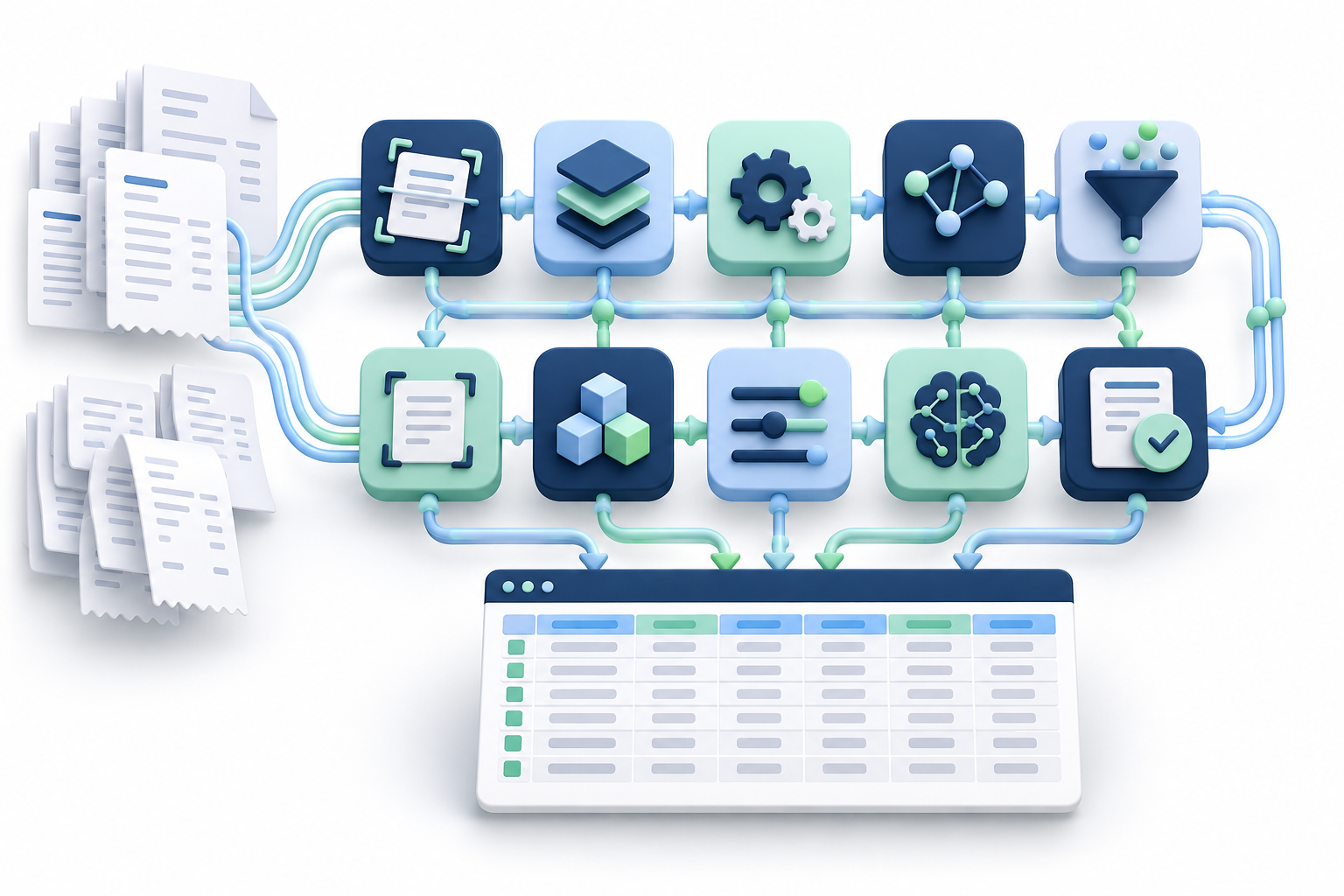
Choosing a data extraction tool starts with the output: a reviewed Excel table, structured API data or searchable text. These are different jobs, even when all begin with the same invoice PDF.
This Q3 2026 shortlist covers July–September as an editorial theme. It was published on October 12, 2026; prices and limits below were checked at publication and are not an archived record of Q3 pricing. IntoExcel publishes this comparison. The numbering is not a measured accuracy ranking, and we have not benchmarked these ten tools against each other.
Compare the workflow before the price
| Need | Options to evaluate |
|---|---|
| Choose fields and download Excel | IntoExcel |
| Reusable rules or email-based extraction | Docparser, Parseur |
| Team processing and review workflows | Nanonets, Rossum |
| Convert PDF tables | Adobe Acrobat Export PDF |
| Build a document-processing integration | Amazon Textract, Google Document AI, Azure Document Intelligence |
| Run local image-to-text OCR | Tesseract |
USD figures are examples of the stated plans or API tiers. Page credits, documents, workflow runs and subscriptions are not interchangeable. Allow for taxes, engineering, storage and review time where applicable.
1. IntoExcel — document data to Excel
Use: upload PDFs or images, select default or custom fields, review an editable table and export. Choose one row per document or per item. Custom types include Auto, Text, Number, Percentage and Currency.
Price: 20 free extractions/month, Pro at $9/month for 200, Business at $40/month for 1,000. See pricing.
Start: open the extraction page, upload a small batch, select fields and row mode, extract, check and export.
Limits: one distinct document per file; the current flow processes the first distinct document and returns up to 500 rows per file. Review notices. Missing values remain blank; extraction does not confirm payments or reconcile records.
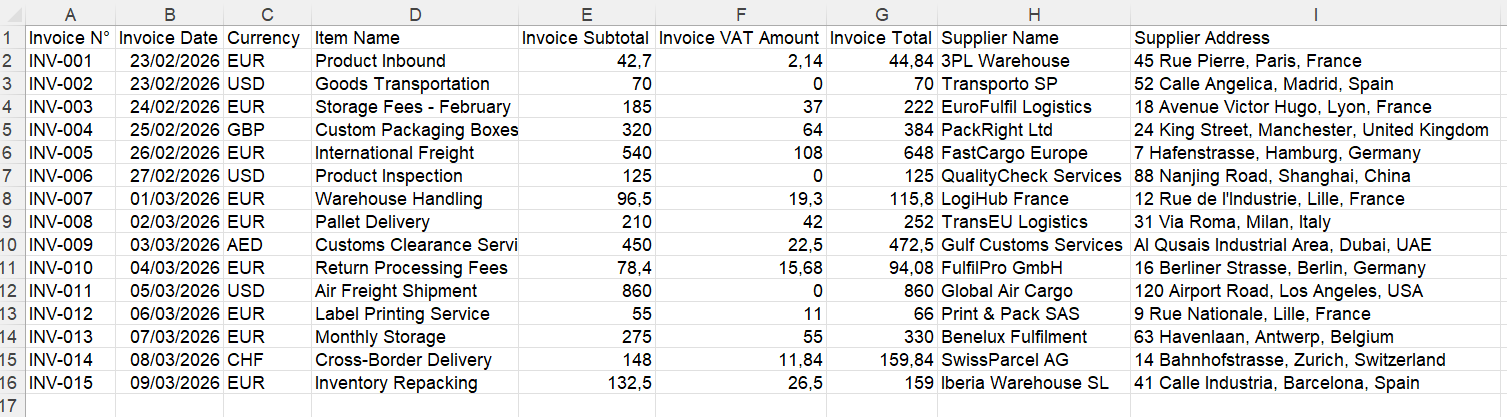
Example of a document-level invoice table.
2. Docparser — reusable parsing rules
Use: a candidate for recurring document formats when you want explicit field and table rules.
Price: Starter $39/month, 100 credits, 15 parsers; one credit covers a document up to five pages.
Start: create a parser, upload a sample, configure field/table rules, test and export to Excel.
Limits: default 20 MB, recommended 8 MB; default 50 pages, with a fixed 50-page ceiling for scanned OCR documents.
Our suggested test: change a supplier layout and measure the maintenance needed. Confirm advanced table features in the selected plan.
Docparser · Pricing · Guide · Limits
3. Parseur — email and document intake
Use: evaluate it when incoming email is part of the extraction process.
Price: Micro $49/month for 100 pages. The free allowance is 20 credits/month; one page consumes one credit.
Start: create a mailbox, define fields, send a sample document, review the extracted data and use Download/Export.
Limits: monthly unused credits expire; new processing stops at quota unless capacity is added. Confirm attachment sizes and document formats for your mailbox before automating intake.
Our suggested test: send an email with attachments and check how separate documents consume credits.
Parseur · Pricing · Guide · Credits
4. Nanonets — configurable processing workflows
Use: invoice extraction with a workflow around review and export, rather than only a standalone spreadsheet conversion.
Price: Starter lists $100/month for 100 credits after initial free credits; complex AI blocks cost $0.30/run. Multiple blocks can run for one document.
Start: choose the invoice extractor, test fields on samples, inspect results and download XLSX from the extraction screen.
Limits: obtain the applicable file, page and throughput limits for your account. Do not interpret 100 credits as 100 invoices.
Our suggested test: price the entire configured workflow, including repeated processing and export, before committing volume.
5. Adobe Acrobat Export PDF — PDF-to-workbook conversion
Use: a candidate when the goal is an editable version of a PDF table.
Price: US offer $23.88/year, equivalent to $1.99/month, billed annually, with unlimited PDF conversions. This is Export PDF, not Acrobat Pro.
Start: sign in on Acrobat web, choose Convert → Export a PDF, select the file and Microsoft Excel, then export.
Limits: files above 100 MB are rejected; complex documents can fail below that size.
Our suggested test: inspect merged cells and repeated headers before combining suppliers into one register.
6. Amazon Textract — AWS extraction APIs
Use: OCR and structured document processing for developers; AnalyzeExpense targets invoices and receipts.
Price: Oregon initial tiers: basic OCR $1.50/1,000 pages; AnalyzeExpense $10/1,000 pages. Other analysis features have separate rates.
Start: configure AWS access, test an invoice through the appropriate API, inspect returned fields and map them to your output columns. Build review and Excel export separately.
Limits: asynchronous PDF/TIFF processing supports up to 500 MB and 3,000 pages; synchronous processing has smaller limits. Check the operation-specific documentation.
Our suggested test: compare complete integration cost, not just the page rate.
Amazon Textract · Pricing · Limits
7. Google Document AI — specialized processors
Use: developer workflows using an invoice processor or other document-specific extraction.
Price: Invoice Parser is $0.10 per document block of up to ten pages; other processors have different pricing.
Start: create a Cloud project and processor, select location/version, submit a sample and map returned entities to your database or workbook.
Limits: online requests allow 40 MB, batch requests 1 GB; page limits depend on processor and mode. Do not assume the file-size ceiling means every page count is accepted.
Our suggested test: verify the exact processor/version on your layouts before scaling.
Google Document AI · Pricing · Guide · Limits
8. Azure Document Intelligence — Microsoft-cloud integration
Use: developers evaluating prebuilt invoice extraction or custom document models.
Price: paid usage is metered by model/pages. Select region and currency in the official calculator; a universal paid rate was not verifiable from the public page reviewed.
Start: create a resource, test the invoice model in Document Intelligence Studio, inspect fields and connect the API to your application.
Limits: published analysis limits include 4 MB/two pages on F0 and 500 MB/2,000 pages on S0, subject to format/model constraints.
Our suggested test: ensure a free-tier result has not silently excluded later pages.
Azure Document Intelligence · Pricing · Limits
9. Rossum — document review and business workflows
Use: evaluate it for a team process with validation and downstream integration.
Price: custom quote, based on volume and workflow complexity; confirm add-ons and overage terms.
Start: define fields and a queue, import sample documents, review captured values, then configure export to the target system.
Limits: use the import specification for supported files and extraction constraints; request the contracted page allowance and throughput in writing.
Our suggested test: have the people who handle exceptions trial the review process, and include integration work in the quote.
Rossum · Pricing · Import · Guide
10. Tesseract OCR — local image-to-text processing
Use: a free, open-source OCR engine when you can manage preprocessing and field extraction yourself.
Price: no hosted API fee for self-hosted use; hardware, maintenance and development remain your costs.
Start: install Tesseract and the appropriate language data, prepare a clear image, then run tesseract input.png output -l eng. Review the text before writing parsing rules.
Limits: no built-in semantic invoice schema or ready-made Excel workflow. PDF pages need conversion to supported image input. Capacity depends on your setup.
Our suggested test: include poor scans and the time required to turn text into reliable columns.
Test the result you actually need
For a hypothetical pilot, use ten representative files: a clear PDF, a scan, several supplier layouts and a multi-page document. Ask for the same fields and record missing values, wrong amounts, omitted rows and correction time. This is a proposed method, not a claim of measured performance.
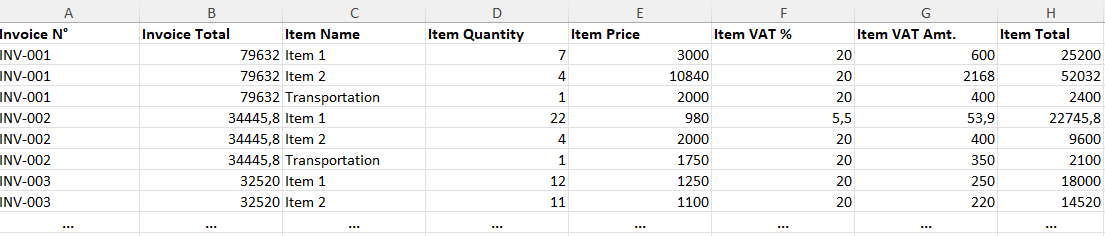
Item-level output has a different purpose from a document summary. Avoid adding repeated invoice totals.
Check identifiers, dates, currency and numeric types. An empty value is different from zero. API JSON, OCR text and a reviewed Excel workbook require different amounts of additional work.
For a direct spreadsheet workflow, try the IntoExcel.com extraction page. For preparation advice, read how to extract invoices into structured Excel. Choose on the basis of your documents and review effort, not the longest feature list.
Ready to try it yourself?
Stop wasting hours on manual data entry. Extract your PDF data to Excel instantly with our AI-powered tool.
Extraction