Best Invoice to Excel tools in 2026
Choose an invoice-to-Excel tool based on the spreadsheet you need: selected invoice fields, reusable parsing rules or PDF table conversion.
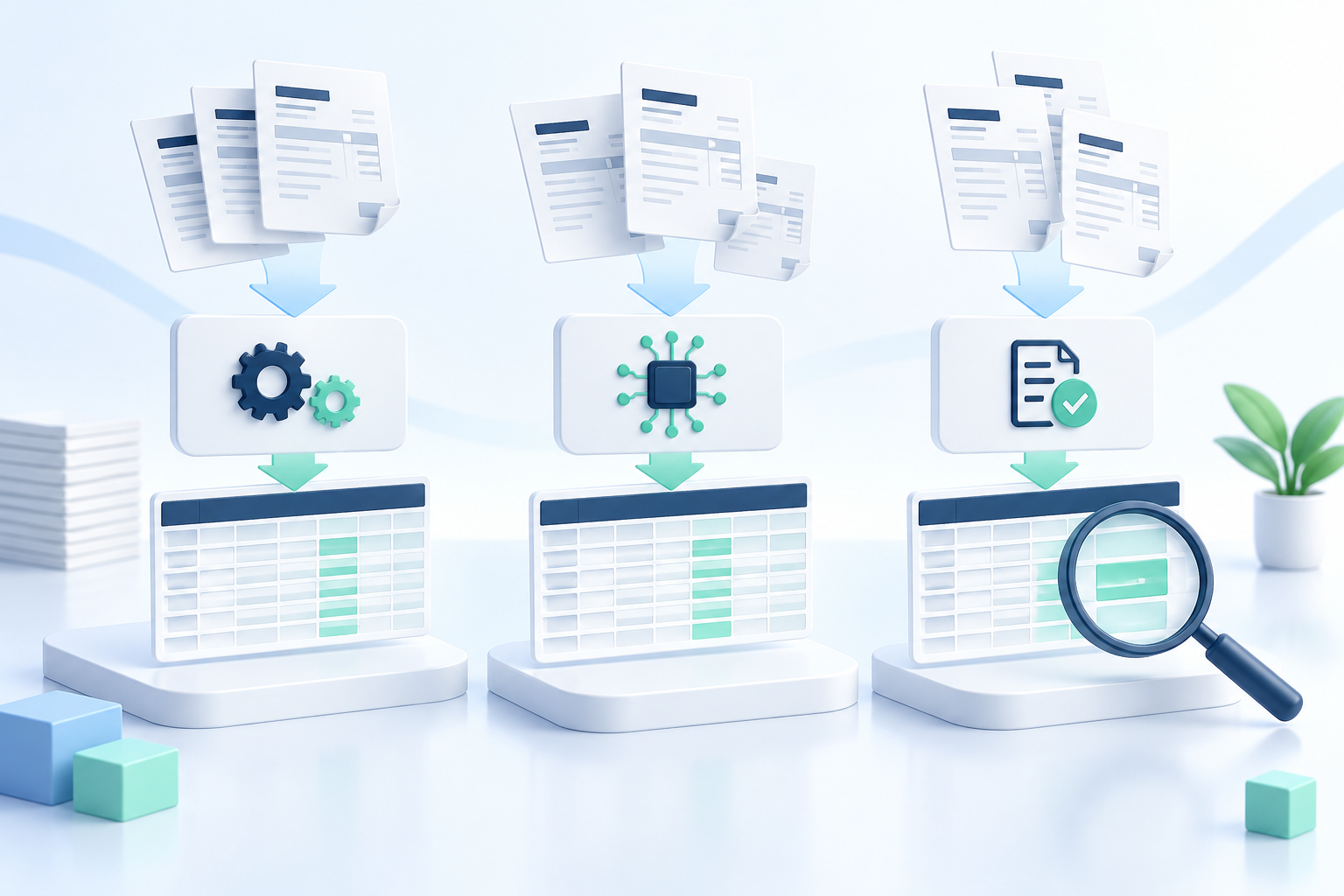
The best invoice-to-Excel tool in 2026 depends on the spreadsheet you need. A purchase register with one row per invoice is different from a detailed list of products. Converting a PDF’s layout into cells is also different from extracting the same fields from many supplier formats.
This guide compares IntoExcel.com, Docparser and Adobe Acrobat Export PDF. It is an editorial comparison published by IntoExcel, not an independent accuracy benchmark. Features and prices were checked on September 29, 2026 using the app’s implementation and official vendor documentation. USD prices and local offers can change.
Which approach fits your invoices?
| Tool | Our suggested use | What to evaluate |
|---|---|---|
| IntoExcel | Select invoice fields and export document or item rows | Missing fields, amounts and row completeness |
| Docparser | Build reusable rules for recurring documents | Initial setup and maintenance across layouts |
| Adobe Acrobat Export PDF | Convert an existing PDF table into an editable workbook | Whether the output matches your reporting columns |
These are suggested starting points. Try your actual invoices before choosing a paid plan.
1. IntoExcel: selected invoice fields to Excel
IntoExcel accepts PDFs and images and lets you choose default or custom columns. You can request one row per document or one row per item, review the editable results and export an Excel workbook.
For a register, start with supplier, invoice number, date, subtotal, tax, total and currency. For item analysis, add description, quantity, unit price and line amount. Custom field types include Auto, Text, Number, Percentage and Currency.
Prices: 20 free monthly extractions; Pro costs $9/month for 200, and Business $40/month for 1,000. Check the IntoExcel pricing page for the current offers. These allowances count extractions, not exported rows.
How to start:
- Open the IntoExcel extraction page.
- Upload a few representative invoices and choose your fields.
- Select document or item rows before extracting.
- Review the table against the originals, then export to Excel.
Limits: keep one distinct invoice per file. The current extraction processes the first distinct document and returns at most 500 rows per file. Check any ambiguity or limit notice. Missing values become blank cells, not invented entries. Uncertain currency symbols can remain symbols; the tool does not perform currency conversion.
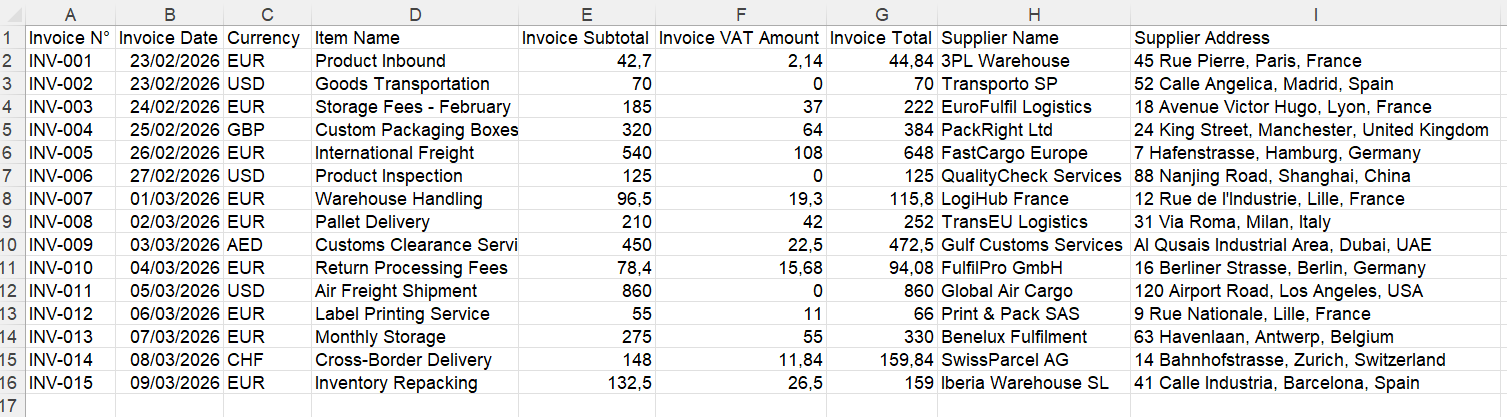
Example of a document-level invoice register.
2. Docparser: reusable extraction rules
Docparser is worth evaluating when you want to define and maintain how recurring invoice data is read. Its rules can target individual fields or tables. Our recommendation is to test both familiar and changed supplier layouts before reusing a configuration.
Price: Starter is $39/month for 100 credits; one credit covers a document of up to five pages. The plan includes 15 parsers. Official pricing.
Setup: create a parser, upload a sample, add field or table rules, test the output and export. Use the rule tutorial to choose appropriate presets.
Limits: default upload size is 20 MB; Docparser recommends 8 MB. The default page limit is 50, with a fixed 50-page ceiling for scanned OCR documents. File limits.
Excel downloads are supported. The feature overview also describes other export formats and integrations.
For your trial, inspect what happens when a supplier moves the tax total or adds a second item table. The practical cost includes your setup and correction time, not just credits. Confirm the plan’s table features before purchasing it for complex line items.
3. Adobe Acrobat Export PDF: PDF conversion
Consider this option when your main task is turning an existing invoice table into an editable spreadsheet. Our comparison distinguishes preserving a document’s arrangement from building a common invoice register: inspect the converted columns before combining different suppliers.
Price: the US Export PDF offer is $23.88/year, equivalent to $1.99/month, billed annually, with unlimited PDF conversions. This is the Export PDF subscription, not Acrobat Pro. Official offer.
Setup: sign in on Acrobat web, choose Convert → Export a PDF, upload the invoice, select Microsoft Excel and export. Follow the web tutorial.
Limits: Export PDF rejects files above 100 MB; complex files can fail even below that size. Conversion limits.
The service supports conversion of scanned content with OCR. Subscription overview.
After conversion, check merged cells, repeated headings and numeric values. A workbook that resembles the original page may still need cleanup before it becomes a single analysis table.
Test the output, not just the export button
Use a hypothetical pilot of ten invoices: mix supplier layouts, a scan, a multi-page invoice and a credit note. Give every tool the same target columns, then record missing values, wrong amounts, omitted items and correction time. This is a suggested test, not a claim about measured results.
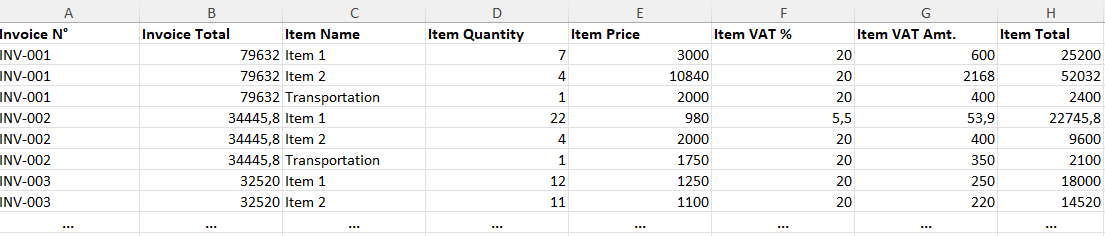
An item-level table serves a different purpose from a one-row-per-invoice register.
Avoid summing invoice totals repeated on every item row. Keep invoice identifiers as text to preserve leading zeros, and keep currency separate from amount. Check that numeric cells support calculations and that missing data has not become zero.
Choose IntoExcel for a direct field-selection workflow, evaluate Docparser when reusable rules are central, or test Adobe for PDF-to-workbook conversion. For a practical walkthrough, see how to extract invoices into structured Excel.
To start with your own documents, open the IntoExcel.com extraction page and compare a small export with the source invoices.
Ready to try it yourself?
Stop wasting hours on manual data entry. Extract your PDF data to Excel instantly with our AI-powered tool.
Extraction