Why It’s Useful to Keep an Excel File with All Your Document Data
Turn scattered PDFs into a useful Excel register. Learn which columns to keep, how to organize document and item rows, and how IntoExcel helps.

A folder of PDFs preserves your documents, but it does not give you an easy overview of the information inside them. To find one invoice, compare purchases or prepare a report, you may have to open the same files repeatedly.
Keeping key document data in Excel gives you a working index alongside those originals. With IntoExcel.com, you can extract selected values from PDFs and images, review them and download a spreadsheet to start that index.
Find information without reopening every document
A consistent register puts references, dates, supplier names and amounts in predictable columns. You can search for a reference, sort by supplier or filter the records you want to inspect.
The spreadsheet helps you locate and compare information; keep the original files for details and verification. Add a source filename or link in your master workbook so you can return to the relevant document.
Compare records using the same columns
Documents from different suppliers may present the same information in different places. Bringing selected values into a shared structure makes comparison easier.
Useful questions include:
- Which invoices came from a particular supplier?
- Which purchase records contain the same product?
- Which entries still need review because information is missing?
- Which document references appear more than once?
These are tasks you perform on the checked spreadsheet. IntoExcel prepares the extracted data; it does not automatically reconcile payments or identify every duplicate.
Choose a useful structure before extracting
“All your document data” does not mean every word belongs in one enormous worksheet. Keep related records together and use separate sheets or files when they describe different things.
For an invoice register, start with:
| Column | Purpose |
|---|---|
| Supplier | Identify the source of the invoice |
| Invoice reference | Find the record and check possible duplicates |
| Invoice date | Organize records by the date shown |
| Subtotal, tax and total | Keep different amounts separate |
| Currency | Avoid combining unlike currencies |
| Source file or link | Return to the original; add this in Excel |
| Review status | Track your own checks; maintain this in Excel |
Use consistent labels when adding later batches. A purchase order and its related invoice may describe the same purchase, so keep document types distinct rather than adding their totals together.
Decide what each row represents
Choose one row per document for an overview of invoices or receipts.
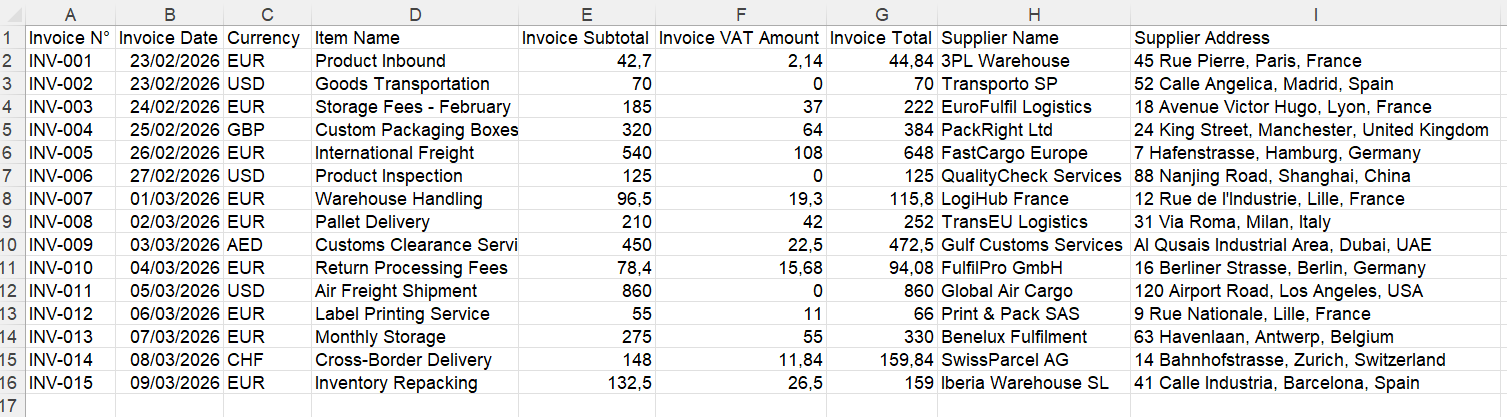
Example document-level export. The selected fields determine the columns.
Choose one row per item when your task needs individual products or repeated entries, such as bank transactions.
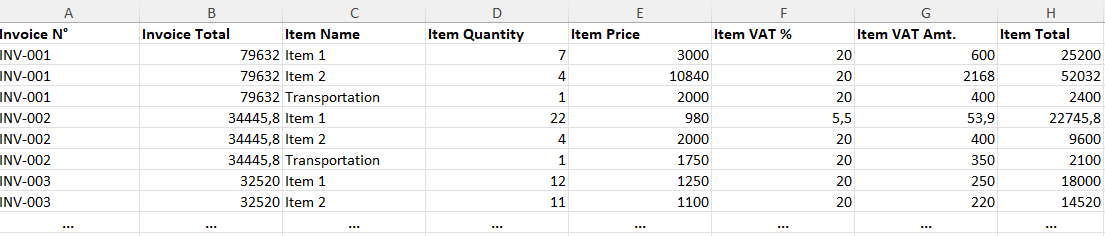
Example item-level export. Document references help keep related rows together.
Do not mix summary rows and item rows in the same totals calculation. A document total may repeat on each item row; adding those repeated values would count the same total several times.
Build your first file with IntoExcel
- Open the IntoExcel extraction page and upload readable PDFs or images.
- Select default fields or create custom fields for the values you need.
- For custom fields, choose Auto, Text, Number, Percentage or Currency. Use Text for references and Number for amounts.
- Choose your row layout and run extraction.
- Compare the results with the originals, edit corrections and download Excel.
Keep separate documents in separate files. When a file contains several distinct documents, IntoExcel processes only the first.
The export contains the requested columns. Add workbook-management information such as source links and review status yourself; those are not values the AI should invent from the document.
Keep the workbook useful over time
When another batch arrives, extract it using the same fields, review it and add the checked rows to your master workbook in Excel. IntoExcel's download is a batch export, not an automatic update to an existing workbook.
Before combining batches:
- Match column names and row layouts.
- Check possible duplicates using supplier and document reference, then confirm against the originals.
- Keep amounts in different currencies separate.
- Check that calculation fields contain numbers. Dates are extracted as text and may need conversion in Excel.
- Investigate blank cells rather than treating them as zero.
- Keep a backup before making substantial changes.
For a hypothetical monthly routine, you could export new supplier invoices, review them, add source links and append them to an invoice register. That is a suggested process, not a customer case study.
Start with the information you actually use
A useful workbook is one you can understand, verify and maintain. Start with a small set of columns for one recurring task rather than collecting fields you never consult.
IntoExcel uses AI and can make mistakes, so review remains part of the process. Once checked, the spreadsheet becomes a reusable starting point for your searches, comparisons and reporting.
Ready to try it yourself?
Stop wasting hours on manual data entry. Extract your PDF data to Excel instantly with our AI-powered tool.
Extraction