Top 5 Document Data Extraction Tools in 2026
Stop manual typing. Compare the top 5 tools for converting PDFs and images into structured Excel data in 2026.

Businesses today handle huge volumes of documents: invoices, receipts, purchase orders, contracts, and financial reports. Extracting data from these documents manually can take hours and introduce costly errors.
Fortunately, modern AI document extraction tools can automatically read PDFs and images and convert them into structured data, often exporting directly to Excel or other systems.
In this article, we compare 5 of the best document extraction tools in 2026, highlighting their strengths, weaknesses, and ideal use cases.
1. IntoExcel — Best for Simple Document-to-Excel Extraction
IntoExcel is designed for one specific goal: turning any document into a clean Excel file with structured data. Unlike many enterprise platforms, it focuses on simplicity and speed. Users can upload invoices, receipts, or reports and extract the relevant information into Excel in seconds.
Key features:
- Extract data from PDFs, images, and scanned documents
- Export results directly to Excel
- Create custom fields for extraction
- Choose one row per document or one row per line item
- Works with many document types
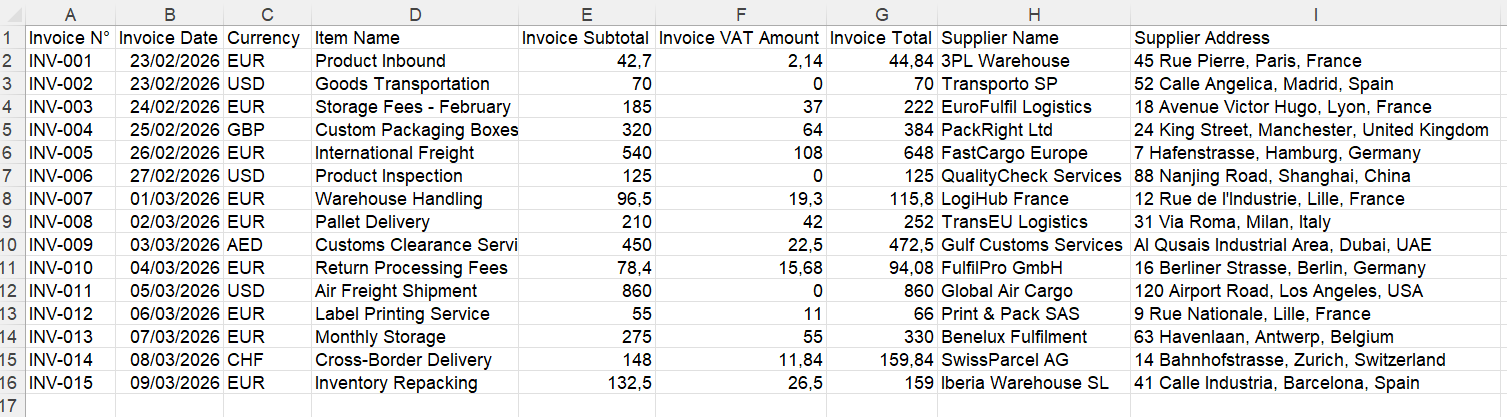
One unique feature is the ability to extract detailed invoice items, where each product line from an invoice becomes a separate row in Excel.
This is particularly useful for:
- accountants
- e-commerce businesses
- procurement teams
- finance departments
Best for:
- accountants
- small businesses
- people working with Excel
- invoice and receipt extraction
Example of extraction
2. Nanonets — Best for Automated Workflows
Nanonets is a popular AI document processing platform used by many companies to automate document-heavy workflows. The platform combines OCR and deep learning models to extract structured data from documents such as invoices, receipts, and purchase orders.
Key features:
- AI OCR document processing
- automation pipelines
- API integrations
- accounts payable automation
Pros:
- powerful automation capabilities
- scalable for large companies
Cons:
- complex setup
- higher pricing for small teams
Best for:
- large companies
- automation workflows
- enterprise finance teams
3. Docparser — Best for Template-Based Extraction
Docparser is a cloud platform designed to extract structured data from documents like PDFs and images. The tool works by allowing users to create parsing rules or templates that identify where data appears in a document.
Key features:
- rule-based parsing
- integrations with Excel and Google Sheets
- Zapier automation
Pros:
- flexible rule creation
- good integrations
Cons:
- templates may break when document formats change
- requires setup for each layout
Best for:
- recurring document formats
- automation workflows
4. Rossum — Best for Enterprise Document Processing
Rossum is an enterprise-grade document processing platform designed for high-volume invoice processing. It uses AI to process documents such as invoices and purchase orders and automate document workflows.
Key features:
- AI document understanding
- workflow automation
- ERP integrations
Pros:
- strong enterprise features
- scalable automation
Cons:
- expensive
- complex implementation
Best for:
- enterprise finance teams
- large-scale invoice processing
5. Amazon Textract — Best for Developers
Amazon Textract is a machine learning service from AWS that extracts text, tables, and forms from scanned documents. Unlike many SaaS tools, Textract is primarily an API for developers, meaning businesses must build their own workflows around it.
Key features:
- extract text from scanned documents
- identify tables and form fields
- deep AWS integrations
Pros:
- very powerful
- highly scalable
Cons:
- requires technical integration
- not beginner friendly
Best for:
- developers
- large data pipelines
Quick Comparison
| Tool | Best For | Ease of Use | Excel Export |
|---|---|---|---|
| IntoExcel | Fast document-to-Excel | ⭐⭐⭐⭐⭐ | Yes |
| Nanonets | Automated workflows | ⭐⭐⭐ | Yes |
| Docparser | Template-based extraction | ⭐⭐⭐ | Yes |
| Rossum | Enterprise processing | ⭐⭐ | Yes |
| Amazon Textract | Developers and APIs | ⭐ | Requires setup |
What to Look for in a Document Extraction Tool
When choosing a document extraction tool, consider:
Accuracy
Modern AI tools can reach 95–99% accuracy when extracting structured data from invoices and similar documents.
Document types supported
Make sure the system supports:
- PDFs
- scanned documents
- images
Output format
Many businesses prefer exporting results directly to Excel spreadsheets.
Ease of use
Some tools require technical setup, while others work instantly.
Final Thoughts
Document data extraction tools have evolved significantly in recent years. AI-powered systems now allow companies to convert documents into structured data automatically, saving hours of manual work.
The best solution depends on your needs:
- IntoExcel → best for fast document-to-Excel extraction
- Nanonets → strong automation workflows
- Docparser → template-based parsing
- Rossum → enterprise invoice automation
- Amazon Textract → developer-focused API
If your goal is simply to turn documents into clean Excel files quickly, IntoExcel offers one of the simplest and fastest solutions available.
Ready to try it yourself?
Stop wasting hours on manual data entry. Extract your PDF data to Excel instantly with our AI-powered tool.
Extraction