5 Jobs That Absolutely Need Automatic Data Extraction
See which document fields matter for five professional workflows, when to use document or item rows, and how IntoExcel exports the results to Excel.

If your work regularly starts with a PDF and ends in a spreadsheet, you know the routine: find a reference, copy a date, type an amount and repeat. Automatic document data extraction can take over part of that transfer so you can focus on checking and using the information.
IntoExcel.com turns requested data from PDFs and images into an editable table for Excel export. The five roles below are useful candidates for this workflow. Whether it is worthwhile depends on your documents and the review required, rather than your job title alone.
The examples are suggested workflows, not customer case studies or measured performance claims.
1. Accountants and bookkeepers: prepare an invoice register
Supplier invoices and expense receipts contain details that often need to be brought together in one spreadsheet.
Fields to extract: supplier name, invoice number, invoice date, subtotal, tax amount, total and currency.
Choose one row per document to build a register. After reviewing the results, you can sort the exported spreadsheet by supplier or date and use it as an input to your usual accounting process.
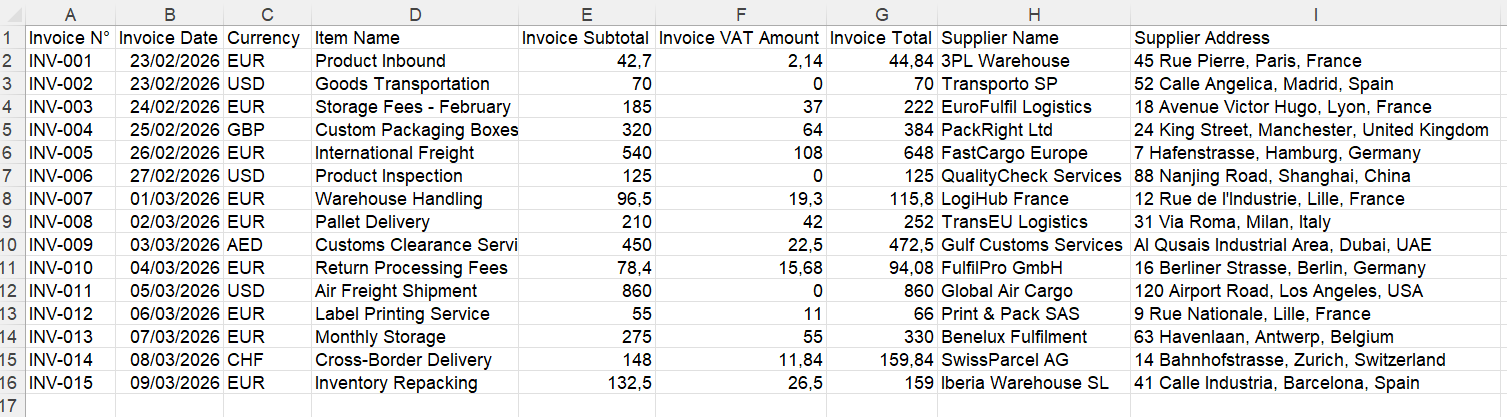
Example of one row per document. Your selected fields determine the columns.
Check invoice references and amounts against the originals, and look for duplicate documents. An Excel export does not itself create entries in accounting software.
2. Purchasing teams: compare supplier line items
Purchase orders, quotations and supplier invoices may list products with different quantities, prices and references. A table can make those details easier to compare.
Fields to extract: supplier, document reference, product description, supplier item code, quantity, unit price and currency. Add custom fields where the default options do not cover your document.
Choose one row per item when you need the individual products. In Excel, compare like-for-like units and keep currencies separate before drawing conclusions about prices.
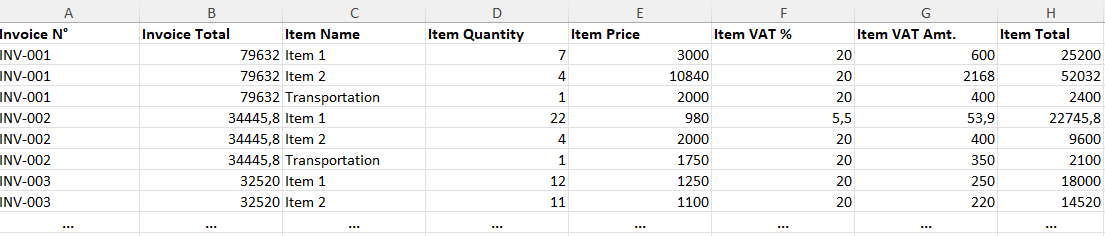
Example of item rows. Shared invoice totals may repeat; do not add those repeated totals as if they were item amounts.
For example, a buyer could compare the same product across two quotations. That comparison still requires checking whether one price is per unit and the other per pack.
3. E-commerce managers: organize purchase records
Supplier invoices and packing lists can help an online seller prepare a spreadsheet of purchased products without retyping every line.
Fields to extract: supplier, invoice reference, product code, item description, quantity and unit price.
Use Text for custom product-code fields so identifiers are treated as references, and Number for quantities and amounts. Review codes and quantities before using the export in a purchase-cost worksheet.
A hypothetical seller could combine checked purchase data with sales and fee data already held elsewhere. IntoExcel extracts the requested document values; it does not automatically calculate a complete profit margin or synchronize a store's stock.
4. Financial analysts: prepare source data for analysis
Bank statements, expense reports and other financial documents can contain repeated entries that an analyst needs in a worksheet.
Fields to extract: transaction date, description, debit, credit, currency or a clearly named reporting-period value, depending on the document.
Use item rows for transactions and document rows for a summary. When a report contains several unrelated tables, specify the requested fields precisely and check that the results refer to the correct table and period.
For example, “Revenue for the year ended 2025” is more specific than “Revenue.” Extraction prepares source data; calculations, interpretation and checks remain part of the analysis.
5. Operations and logistics coordinators: assemble delivery records
Delivery notes, packing lists and shipping documents contain references that teams may need to compare with purchase or receipt records.
Fields to extract: delivery reference, order number, item code, dispatched quantity, destination and the delivery date shown on the document.
Choose document rows for a delivery register or item rows for package contents. Clear labels such as “Dispatched quantity” help distinguish what was shipped from what was ordered.
A hypothetical coordinator could compare the checked export with an existing order list in Excel. The document's date or status should not be mistaken for live tracking: IntoExcel does not update shipment events.
How to use IntoExcel for your workflow
- Open the IntoExcel extraction page and upload readable PDFs or images.
- Select the default fields you need, or add custom fields with Auto, Text, Number, Percentage or Currency kinds.
- Choose one row per document or one row per item before starting extraction.
- Compare the extracted table with the sources, edit corrections and download the Excel workbook.
Keep distinct documents in separate files. If one file contains several separate documents, IntoExcel processes only the first.
Start with one recurring task
Choose a task you repeat, define the spreadsheet you need and try a representative batch. Count the time spent reviewing and correcting as well as the time spent extracting.
IntoExcel uses AI and can make mistakes. Inspect missing values, ambiguous currencies and any warnings before relying on the data. A blank cell means a value was not found, not that the value is zero.
For these five roles, the practical opportunity is the same: spend less effort moving information between documents and spreadsheets, while keeping control of the final result.
Ready to try it yourself?
Stop wasting hours on manual data entry. Extract your PDF data to Excel instantly with our AI-powered tool.
Extraction