OCR vs AI Document Extraction: What’s the Real Difference?
Is OCR enough for your business? We explain the critical differences between Optical Character Recognition and AI Document Extraction to help you choose the right tool.

When working with documents like invoices, receipts, or bank statements, you often hear about two technologies: OCR and AI document extraction.
They are sometimes used interchangeably, but they are not the same thing.
Understanding the difference is important if you want to choose the right tool to extract data efficiently.
In this article, we explain what OCR is, what AI document extraction is, and how they differ in real-world use.
What Is OCR?
OCR stands for Optical Character Recognition. It is a technology that recognizes text characters inside an image or a scanned document.
For example, if you upload a photo of an invoice, OCR converts the pixels into letters and numbers.
However, OCR does not "understand" what it is reading. It simply gives you a block of text, like this:
OCR Output Example: Invoice 12345 Total 250.00 Date 2026-03-01
The data is there, but it is not organized. You cannot easily tell which number is the total and which is the invoice ID without looking at it yourself.
What Is AI Document Extraction?
AI document extraction goes further than OCR.
It not only reads the text but also understands the structure and meaning of the document.
Instead of returning raw text, it extracts structured data.
For example, from the same invoice, AI extraction would return:
| Field | Value |
|---|---|
| Invoice Number | 12345 |
| Date | 2026-03-01 |
| Total | 250.00 |
It can also extract line items such as:
| Product | Quantity | Price |
|---|---|---|
| Item A | 2 | 50 |
| Item B | 3 | 50 |
Key Differences Between OCR and AI Extraction
| Feature | OCR | AI Document Extraction |
|---|---|---|
| Reads text | Yes | Yes |
| Understands structure | No | Yes |
| Extracts fields | No | Yes |
| Handles tables | Limited | Yes |
| Works with invoices | Partially | Fully |
| Output format | Raw text | Structured data |
Example of AI Document Extraction
Below is an example of how AI can convert a document into structured Excel data.
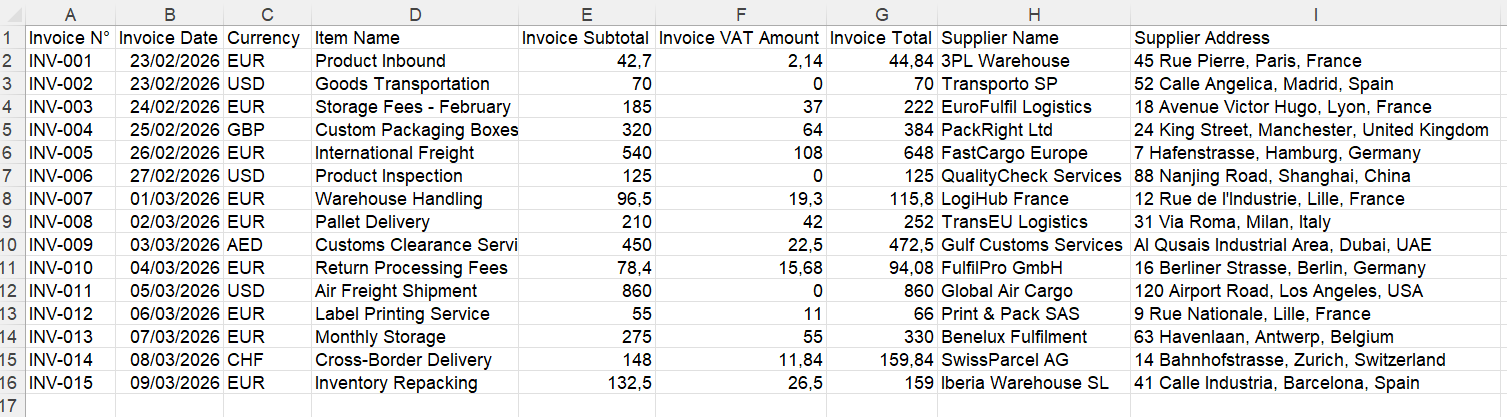
Instead of raw text, the data is clean and ready to use.
Why OCR Alone Is Not Enough
OCR is a good first step, but it has limitations.
If you use only OCR, you still need to:
- identify the important fields manually
- copy and paste data into Excel
- reorganize the information
This means OCR alone does not eliminate manual work.
Why AI Extraction Is More Powerful
AI document extraction builds on OCR and adds intelligence.
It can:
- detect invoice numbers, dates, and totals automatically
- extract line items from tables
- adapt to different document formats
- output clean, structured data
This removes most of the manual work.
When Should You Use OCR?
OCR is useful when you need to:
- digitize scanned documents
- make text searchable
- archive documents
When Should You Use AI Document Extraction?
AI extraction is better when you need to:
- extract structured data from invoices or receipts
- automate data entry
- process large volumes of documents
- generate Excel files automatically
How IntoExcel Uses AI Extraction
IntoExcel combines OCR and AI to deliver structured results.
The process is simple:
- Upload your document
- Select the fields you want
- The system extracts structured data
- Download your Excel file
IntoExcel can also extract line items, meaning each product on an invoice becomes its own row.
Try IntoExcel
If you want to go beyond simple text extraction and get structured data directly, you can try IntoExcel.
👉 Try IntoExcel
Upload your document and receive a structured Excel file in seconds.
Start here:
https://intoexcel.com
You can begin with free extractions to test the system.
Final Thoughts
OCR and AI document extraction are related but serve different purposes.
OCR converts images into text.
AI document extraction turns documents into structured data.
For simple digitization, OCR is enough.
For real business workflows, AI extraction is the better solution.
Choosing the right technology can save time, reduce errors, and make your data much easier to use.
Ready to try it yourself?
Stop wasting hours on manual data entry. Extract your PDF data to Excel instantly with our AI-powered tool.
Extraction