Why Manual Data Entry Is Slowing Down Your Business
Manual data entry feels simple but costs hours of productivity every week. Learn how automation transforms document processing into a fast, accurate workflow.

Many businesses still rely on manual data entry.
Copying information from invoices, receipts, or reports into Excel might seem simple, but it comes at a high cost.
What feels like a small daily task quickly turns into hours of repetitive work every week.
In this article, we explain why manual data entry is slowing down your business and how automation can solve the problem.
The Hidden Cost of Manual Data Entry
Manual data entry does not look expensive at first.
But when you break it down, the impact is significant.
Time loss
Entering data manually takes time:
- 2 to 5 minutes per document
- 100 documents per week = 3 to 8 hours
That is almost one full workday lost every week.
Human errors
Manual work always leads to mistakes:
- wrong numbers
- missing fields
- formatting issues
Even small errors can create serious problems in accounting and reporting.
Lack of scalability
As your business grows, the number of documents increases.
Manual workflows cannot scale.
More documents means:
- more time spent
- more stress
- more errors
Why Businesses Still Do It
If manual data entry is so inefficient, why is it still so common?
Habit
Many teams continue using old processes simply because they are used to them.
Lack of tools
Some businesses are not aware of automation solutions.
Perceived simplicity
Typing data feels easy, even if it is time-consuming.
What Happens Over Time
Manual data entry creates long-term problems:
- delayed reporting
- difficulty tracking data
- inconsistent records
- lower team productivity
Instead of focusing on growth, teams spend time on repetitive tasks.
What Automation Changes
Automation removes the need to type data manually.
Instead of copying information, you can:
- upload your documents
- extract the data automatically
- receive a structured Excel file
Example of Automated Data Extraction
Below is an example of how documents can be converted into structured data automatically.
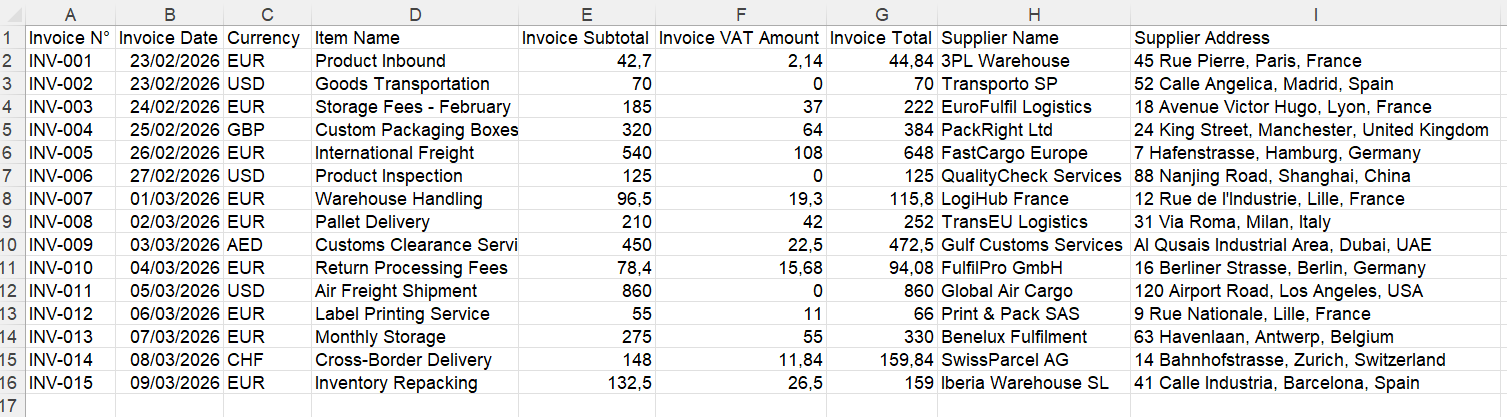
What used to take minutes per document now takes seconds.
Real Productivity Gains
Let’s compare:
Manual process
- 3 minutes per document
- 100 documents = 300 minutes
- 5 hours per week
Automated process
- a few seconds per document
- same 100 documents processed in minutes
This means you can save several hours every week.
Beyond Time Saving
Automation also improves:
Accuracy
No more typing mistakes.
Consistency
All data follows the same structure.
Visibility
Easier to analyze and track information.
Efficiency
Teams can focus on higher-value tasks.
Who Is Most Affected
Manual data entry impacts many roles:
- accountants
- e-commerce sellers
- finance teams
- operations teams
Anyone working with documents and spreadsheets can benefit from automation.
How IntoExcel Helps
IntoExcel allows you to extract data from documents and convert it into Excel automatically.
You can:
- upload invoices, receipts, or reports
- choose the fields to extract
- get structured data instantly
You can also extract:
- one row per document
- or one row per item for detailed analysis
Try IntoExcel
If you spend time typing data manually, automation can make an immediate difference.
👉 Try IntoExcel
Upload your documents and receive a structured Excel file in seconds.
Start here:
https://intoexcel.com
You can begin with free extractions to test the system.
Final Thoughts
Manual data entry might seem harmless, but it slows down your business more than you think.
It costs time, introduces errors, and limits your ability to scale.
By switching to automation, you can:
- save hours every week
- improve accuracy
- simplify your workflows
Replacing manual data entry is one of the easiest ways to improve productivity and focus on what really matters.
Ready to try it yourself?
Stop wasting hours on manual data entry. Extract your PDF data to Excel instantly with our AI-powered tool.
Extraction