How Much Time is Saved per Week Using Automatic Data Extraction?
How many hours could PDF-to-Excel automation save? Compare the full manual and extraction workflows, then measure your own results with IntoExcel.

How much time can automatic data extraction save each week? The answer depends on how many documents you process, which fields you need and how much checking the results require.
Replacing repeated copying with an extraction tool such as IntoExcel.com can free up time, but the useful comparison is the complete workflow: from opening your files to having a checked Excel spreadsheet. Here is a practical way to estimate that difference.
Where manual data entry takes time
For every invoice, receipt or bank statement, you may need to open the file, locate the information, enter it into Excel and check it against the original. A document with several item rows adds more values to transfer.
For a hypothetical example, suppose a team handles 20 invoices a day, five days a week. That is 100 invoices. If entering and checking each invoice takes three minutes, the weekly workload is:
100 × 3 minutes = 300 minutes, or 5 hours.
Three minutes is an assumption for this example, not an industry average. Time your own documents to find a useful starting point.
What changes with automatic extraction?
With IntoExcel, you upload files, select fields, choose one row per document or item, and run extraction. You then review and edit the table before downloading the Excel file.
This reduces the need to type every value, but it still takes time to prepare files, wait for processing, correct results and check the export. A fast extraction alone does not tell you the total time saved.
A worked example: 100 invoices per week
The following figures are illustrative planning assumptions, not an IntoExcel benchmark or customer result. Both methods produce the same checked invoice register.
| Work | Manual workflow | Extraction workflow |
|---|---|---|
| Enter and check 100 invoices | 300 minutes | — |
| Prepare files, choose fields, upload, wait for processing and export | Included above | 20 minutes |
| Review and correct extracted results | Included above | 100 minutes: 1 minute per invoice |
| Total | 5 hours | 2 hours |
Under these assumptions, the saving is 3 hours per week. The 20-minute allowance is an assumed total for this batch, not a promised processing speed.
Review time changes the outcome substantially. If checking and correcting each extracted invoice takes two and a half minutes, the extraction workflow takes 270 minutes in total, saving just 30 minutes. At three minutes per invoice, it takes 320 minutes: 20 minutes longer than the manual workflow.
That is why a test with your own files matters more than a headline speed claim.
Calculate your own weekly saving
Use this calculation, with every value measured in minutes:
Weekly time saved = total manual time − total time using extraction
For extraction, include preparation, field selection, uploading, processing, review, corrections and export. For the manual method, include the equivalent work needed to finish the same spreadsheet.
Record both elapsed time and hands-on time separately if you can work on something else while processing runs. Waiting five minutes does not necessarily mean five minutes of typing avoided.
Measure it with IntoExcel
- Choose a representative sample. Include the layouts and scan quality you usually receive, not just the easiest documents.
- Define the same output for both methods. For example: supplier, invoice reference, date, subtotal, tax, total and currency.
- Time manual entry and checking. Stop when the spreadsheet is ready to use.
- Run the sample through the IntoExcel extraction tool. Select default fields or add custom fields and their kinds.
- Review, correct and export. Include this work in the recorded time and note any unresolved values.
- Compare at the same quality level. Repeat with another sample before extrapolating to your whole week. Familiarity with a sample can make a second attempt faster, so avoid treating one trial as a benchmark.
Choose the row layout that matches your task
For a register of invoices, one row per document keeps each document's key values together.
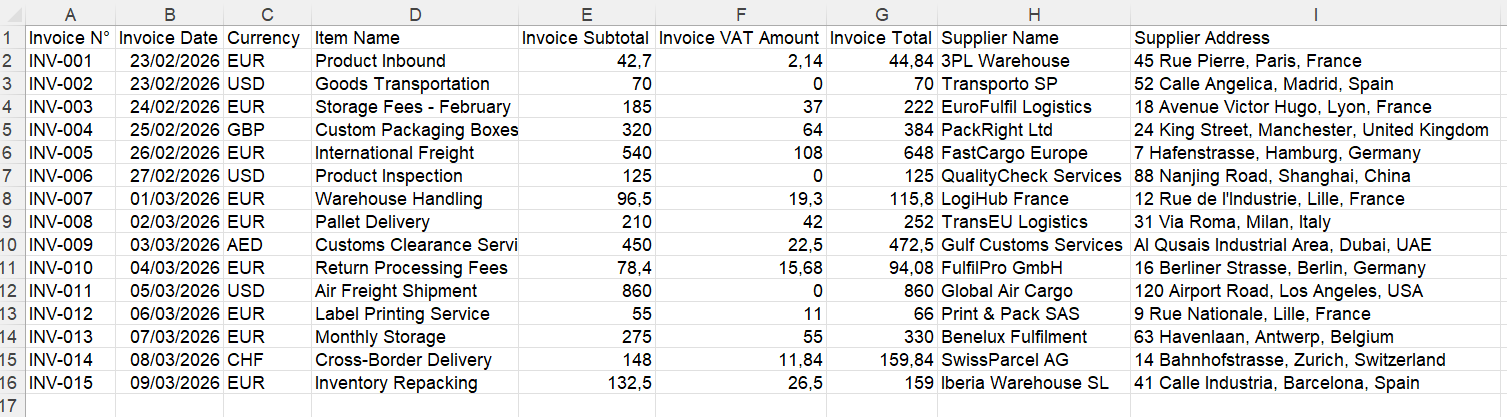
Example output. Your field selection determines the spreadsheet columns.
For product details or bank transactions, one row per item provides separate rows for repeated entries. Detailed rows may take longer to check than a document summary. Shared document totals can repeat, so do not add them together as though they were individual item amounts.
Use a separate file for each distinct document: if a file contains several separate documents, IntoExcel processes only the first.
What can increase or reduce the saving?
Clear source files, precise field names and a consistent column selection can make the workflow easier to review. Blurred scans, ambiguous currencies, many line items or missing information may require more attention.
IntoExcel uses AI and can make mistakes. Check references and amounts against the source, inspect warnings and investigate empty cells rather than treating them as zero. Your extraction allowance also needs to match the volume you plan to process.
Start with a small batch and measure the complete result. The time you recover is the time remaining after the spreadsheet has been checked.
Ready to try it yourself?
Stop wasting hours on manual data entry. Extract your PDF data to Excel instantly with our AI-powered tool.
Extraction