How Much Money Can Businesses Save by Automating Document Data Extraction?
Compare manual data entry with automated PDF-to-Excel extraction, including review costs, and distinguish saved working time from cash savings.

How much money can a business save by automating document data extraction? There is no single amount that applies to every team. The answer depends on document volume, manual entry time, review effort and the cost of the tools you use.
IntoExcel.com helps turn requested information from PDFs and images into an Excel table. To evaluate its value, compare the cost of producing the same checked spreadsheet manually and with extraction.
Start with the cost of manual data entry
Count the work needed to open documents, find values, enter them into Excel and check the result. Include corrections rather than timing only the typing.
A simple estimate is:
Manual cost = documents × minutes per document ÷ 60 × hourly staff cost
Use a staff-cost figure appropriate to your business. Keep the same basis when comparing both methods, and avoid counting the same overhead twice.
For example, 400 invoices at three minutes each require 20 hours. At an assumed staff cost of EUR 30 per hour, that represents EUR 600 of staff time. These are illustrative assumptions, not typical processing times or wage statistics.
Include the full cost of extraction
Automatic extraction changes the tasks; it does not remove every task. Your comparison should include:
- Preparing files and choosing fields.
- Uploading, managing processing and exporting results.
- Reviewing extracted values and correcting mistakes.
- Subscription or credit spending for the period.
- Initial setup and training, recorded separately.
If processing runs while you do other work, distinguish elapsed time from active staff time. Do not count the same staff time against two tasks.
A hypothetical monthly comparison
Suppose a business processes 400 invoices per month. The following model is a planning example, not an IntoExcel performance claim or customer case study. The EUR 30 tool budget is invented for the calculation and is not an IntoExcel price.
| Cost element | Manual workflow | Extraction workflow |
|---|---|---|
| Entry and checking: 400 × 3 minutes | 20 hours | — |
| Review and corrections: 400 × 1 minute | — | 6 hours 40 minutes |
| Other active work: preparation, upload management and export | Included above | 1 hour 20 minutes |
| Total staff time | 20 hours | 8 hours |
| Staff time valued at EUR 30/hour | EUR 600 | EUR 240 |
| Assumed tool spending | EUR 0 additional | EUR 30 |
| Total modeled cost | EUR 600 | EUR 270 |
The difference is EUR 330 per month, or 55% of the modeled manual cost, under these assumptions. Existing costs shared by both methods are omitted. Initial setup or training costs would reduce the first month's benefit.
For an estimate specific to IntoExcel, replace the assumed tool budget with the relevant cost from the pricing page, checking that the allowance or credits cover your intended volume.
Saved time is not automatically cash saved
In the example, extraction frees up 12 hours. That is capacity you might use for reconciliations, reporting or other work.
If the same employees work the same paid hours, payroll does not automatically fall by EUR 360. A cash saving requires an expense to actually decrease, such as paid overtime or outsourced data entry. Otherwise, describe the result as freed capacity and compare its value with the extra tool spending.
What if review takes longer?
Keep the same EUR 30 hourly cost and EUR 30 assumed tool budget:
| Total monthly staff time with extraction | Modeled extraction cost | Difference from EUR 600 |
|---|---|---|
| 8 hours | EUR 270 | EUR 330 lower |
| 12 hours | EUR 390 | EUR 210 lower |
| 20 hours | EUR 630 | EUR 30 higher |
These scenarios include all active work, not just review. They show why checking difficult scans, missing values or many item rows can change the result.
A useful threshold is extra tool cost ÷ hourly staff cost. Here, recovering more than one hour covers the EUR 30 tool budget in staff-time value, before setup costs. It does not guarantee a cash saving.
Test your document-to-Excel workflow with IntoExcel
- Choose a representative batch and define the columns you need.
- Measure manual entry and checking to a finished spreadsheet.
- Open the IntoExcel extraction tool and upload readable PDFs or images.
- Select default or custom fields, and choose one row per document or one row per item.
- Review the results, edit corrections and download Excel. Record all active work and actual tool spending.
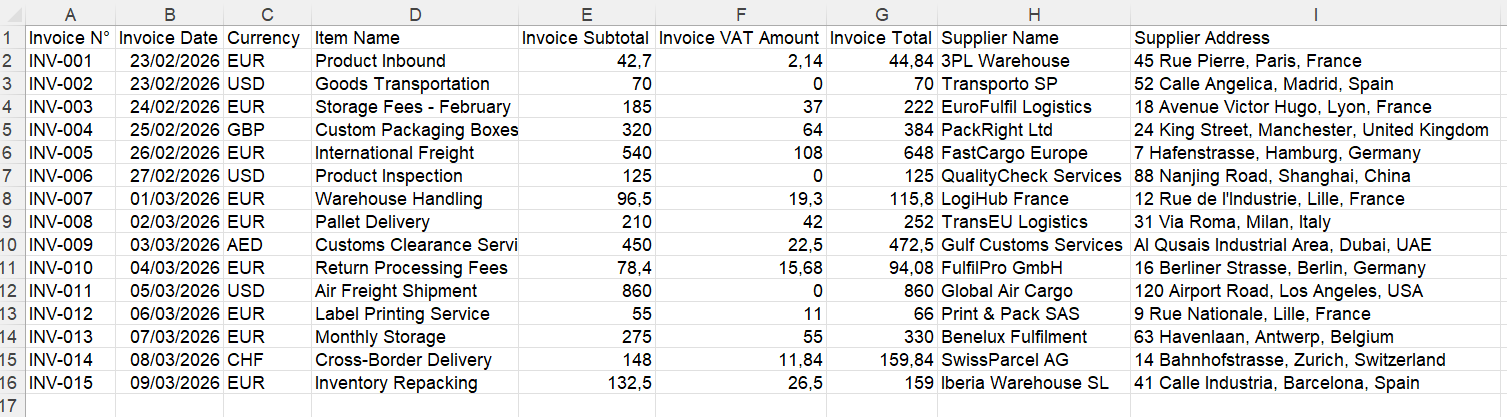
Example of one row per document. Your selected fields determine the columns.
Keep separate documents in separate files: when a file contains several distinct documents, IntoExcel processes only the first. For item rows, avoid adding repeated document totals as though they were item amounts.
IntoExcel uses AI and can make mistakes. Check references, currencies and amounts, and investigate empty cells rather than treating them as zero. Compare both methods at the same quality level before projecting a monthly benefit.
Ready to try it yourself?
Stop wasting hours on manual data entry. Extract your PDF data to Excel instantly with our AI-powered tool.
Extraction