How an Amazon Seller Streamlined Accounting with IntoExcel
Running an Amazon business involves a mountain of paperwork. Learn how one seller centralizes his financial data and saves hours on accounting every week.

Running an Amazon business at scale involves much more than selling products.
Behind the scenes, there is a constant flow of documents:
- supplier invoices
- Amazon fee invoices
- customer transactions
- VAT reports across multiple countries
In this case study, we look at how Vincent, an Amazon seller, uses IntoExcel to organize all his financial data and manage his accounting more efficiently.
The Situation
Vincent sells products across several European marketplaces.
This means dealing with:
- multiple Amazon countries such as France, Germany, Italy, and Spain
- different VAT rates and tax rules
- multiple suppliers, often from different regions
Every month, he receives and generates:
- supplier invoices
- Amazon internal invoices (fees, commissions, storage, etc.)
- sales reports
- VAT-related documents
The Challenge
Before automation, Vincent had to:
- download invoices from Amazon Seller Central
- collect supplier invoices from emails
- track customer-related data
- manually enter everything into Excel
The main issues were:
Too many documents
Hundreds of invoices every month.
Different formats
Each supplier and each Amazon report had a different structure.
VAT complexity
Selling in multiple countries requires tracking:
- VAT collected
- VAT paid
- VAT rates per country
Time-consuming accounting
Manual data entry took several hours every week.
What Vincent Needed
Vincent wanted a way to:
- centralize all financial data
- extract data automatically from documents
- track VAT across countries
- build his own accounting system in Excel
The Solution with IntoExcel
Vincent started using IntoExcel to automate his workflow.
In lieu of manually entering data, he now uploads his documents and extracts structured information automatically.
What Data Is Extracted
Supplier invoices
- supplier name
- invoice date
- product details
- quantities
- unit prices
- totals
Amazon internal invoices
- fees
- commissions
- storage costs
- country of transaction
- VAT amounts
Sales and customer data
- order totals
- marketplace
- transaction dates
Example of Data Organization
Below is an example of how Vincent structures his data after extraction.
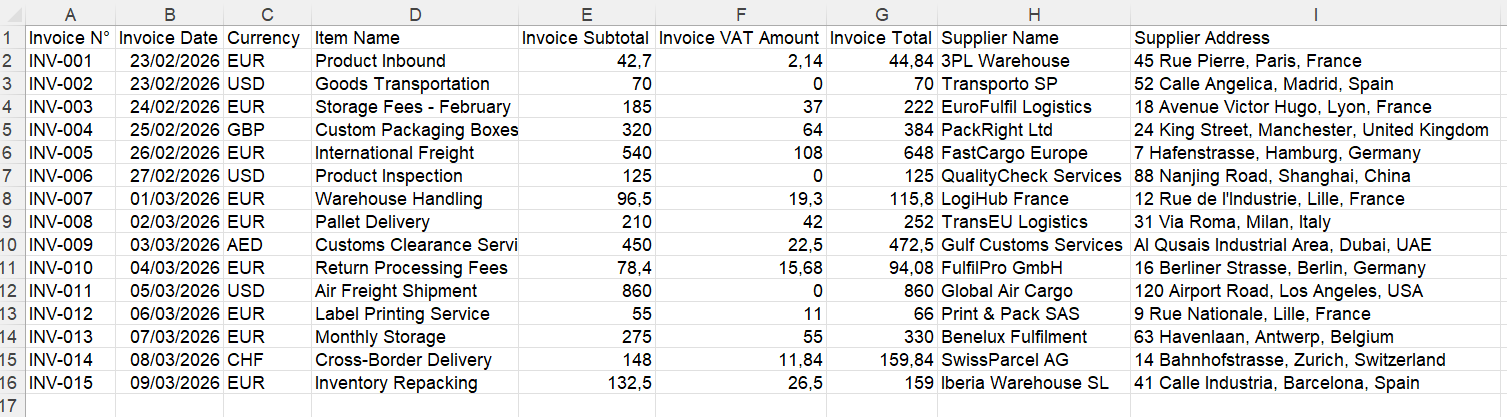
All data is centralized in one Excel file.
Managing VAT Across Europe
One of the most complex parts of Vincent’s business is VAT.
With IntoExcel, he can extract:
- VAT rate
- VAT amount
- country of origin
This allows him to:
- track VAT per country
- prepare OSS declarations
- verify VAT collected and paid
Everything is organized in a way that makes reporting much easier.
Building His Own Accounting
Instead of relying entirely on external tools, Vincent uses Excel as his central system.
With structured data, he can:
- calculate profit per product
- track supplier costs
- analyze Amazon fees
- monitor margins
This gives him full visibility over his business.
Time Saved
Before automation:
- several hours per week spent on manual entry
After using IntoExcel:
- most data extracted in minutes
Vincent can now focus on:
- growing his business
- optimizing products
- managing suppliers
Why This Approach Works
Amazon sellers deal with:
- high document volume
- multiple data sources
- complex tax requirements
Automating data extraction allows them to:
- reduce manual work
- improve accuracy
- centralize information
Try IntoExcel
If you are an Amazon seller managing multiple invoices and reports, automation can simplify your workflow.
👉 Try IntoExcel
Upload your documents and receive a structured Excel file instantly.
Start here:
https://intoexcel.com
You can begin with free extractions to test the system.
Final Thoughts
Managing an Amazon business involves handling a large amount of financial data.
Without automation, this quickly becomes overwhelming.
By using IntoExcel, Vincent was able to:
- automate invoice extraction
- centralize all financial data
- simplify VAT tracking
- build a clear and efficient accounting system
For Amazon sellers looking to scale, having clean and structured data is a major advantage.
Ready to try it yourself?
Stop wasting hours on manual data entry. Extract your PDF data to Excel instantly with our AI-powered tool.
Extraction