How Amazon Sellers Can Automate Invoice Management with IntoExcel
Running an Amazon business involves a mountain of paperwork. Learn how to centralize supplier invoices and Amazon reports into organized Excel files instantly.

Running an Amazon business means dealing with a large number of documents every month.
Between supplier invoices, Amazon reports, and customer transactions, data quickly becomes difficult to manage, especially when selling across multiple countries.
In this article, we explain how Amazon sellers can use IntoExcel to automate invoice extraction and centralize all financial data into Excel.
The Challenge for Amazon Sellers
Amazon sellers typically handle three main types of documents:
1. Supplier invoices
These come from manufacturers or wholesalers, often from different countries such as China, Japan, or Europe.
They can be:
- PDFs
- scanned documents
- emails
- images
Each supplier uses a different format, which makes manual extraction difficult.
2. Customer-related data
Even if Amazon handles most transactions, sellers still need to track:
- sales data
- refunds
- fees
- payouts
This information is often spread across multiple reports.
3. Amazon invoices and tax documents
Amazon generates many internal documents, including:
- fee invoices
- VAT calculation reports
- transaction summaries
- country-specific tax documents
For sellers operating in Europe, this becomes even more complex due to:
- multiple VAT numbers
- different VAT rates per country
- OSS and cross-border rules
Why Manual Processing Becomes a Problem
Without automation, sellers often:
- download multiple reports
- open each document
- copy data into Excel
- try to reconcile everything manually
This leads to:
- hours of repetitive work
- high risk of errors
- difficulty tracking VAT and margins
How IntoExcel Simplifies Everything
IntoExcel allows Amazon sellers to extract data from all these documents and organize everything into structured Excel files.
Step 1: Upload your documents
Upload:
- supplier invoices
- Amazon invoices
- reports or statements
Step 2: Select the fields
Choose what you want to extract:
- supplier name
- invoice number
- country
- VAT rate
- total amount
- product details
- fees
Step 3: Automatic extraction
The system:
- reads PDFs and scanned documents
- detects relevant fields
- structures the data automatically
Step 4: Download your Excel file
You get a clean spreadsheet where all your data is organized and ready to use.
Example of Amazon Data Extraction
Below is an example of how different documents can be unified into one structured Excel file.
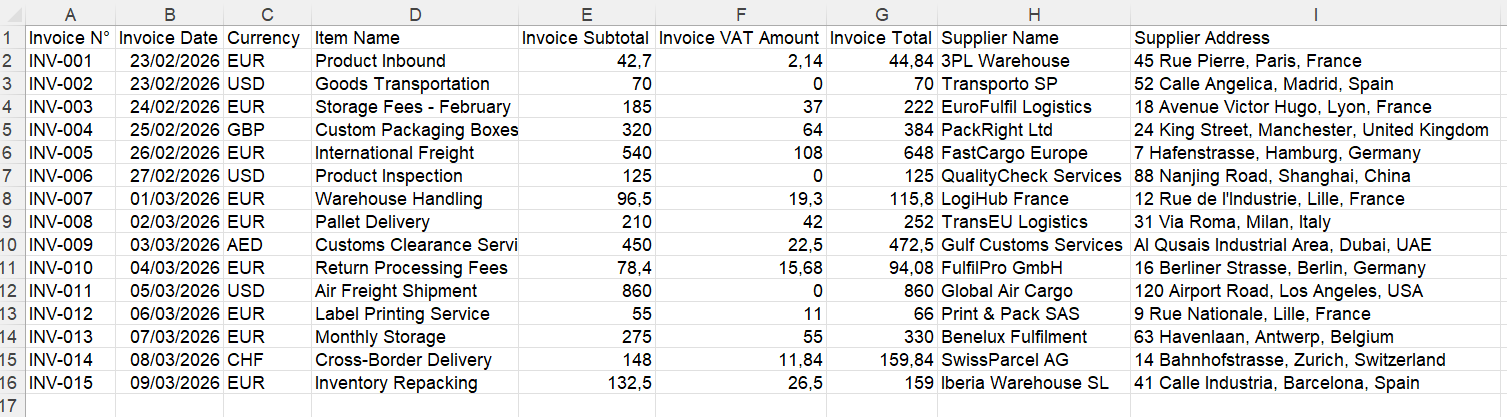
Instead of scattered files, everything is centralized.
Managing VAT Across Multiple Countries
One of the biggest challenges for Amazon sellers in Europe is VAT.
With IntoExcel, you can extract:
- VAT rate per invoice
- VAT amount
- country of transaction
This allows you to:
- track VAT per country
- simplify OSS reporting
- prepare documents for your accountant
Extracting Line Items for Better Analysis
IntoExcel allows you to extract:
- one row per invoice
or - one row per product
This is extremely useful for:
- margin analysis
- product profitability
- supplier comparison
Real Benefits for Amazon Sellers
Save time
Process hundreds of invoices in minutes instead of hours.
Reduce errors
Avoid manual copy and paste mistakes.
Centralize your data
Keep supplier, Amazon, and financial data in one place.
Improve visibility
Understand your costs, fees, and margins clearly.
Who Should Use This
This workflow is ideal for:
- Amazon FBA sellers
- cross-border EU sellers
- e-commerce operators
- finance teams managing marketplaces
Try IntoExcel
If you are an Amazon seller dealing with multiple invoices and reports, automation can make a huge difference.
👉 Try IntoExcel
Upload your documents and get a structured Excel file instantly.
Start here:
https://intoexcel.com
You can begin with free extractions to test the system.
Final Thoughts
Amazon businesses generate a large amount of data from different sources.
Managing this manually is time-consuming and inefficient.
By using IntoExcel, sellers can:
- automate invoice extraction
- centralize financial data
- simplify VAT tracking
- gain better insights into their business
For Amazon sellers looking to scale, having clean and structured data is a major advantage.
Ready to try it yourself?
Stop wasting hours on manual data entry. Extract your PDF data to Excel instantly with our AI-powered tool.
Extraction