How a Travel Agent Uses IntoExcel to Organize Flight and Hotel Invoices
A practical travel-agency example: extract invoice and booking details, choose document or item rows, and review currencies and duplicate records in Excel.

A travel agent may receive an airline invoice, a hotel confirmation and a payment receipt for the same trip. Putting their data in Excel can make the documents easier to find and compare, but those three files do not necessarily represent three separate expenses.
This is a hypothetical workflow, not a customer case study. It shows how a travel agent could use IntoExcel.com to extract flight and hotel invoice data into Excel. No customer results or measured savings are claimed.
Start with a document register
Suppose an agent wants to organize the paperwork for a client's trip. The first task is to record what each file represents: invoice, booking confirmation, ticket or receipt.
Use one row per document for this register. Keep the supplier, document reference, date, amount and currency together. A booking reference is not always an invoice number, and a passenger is not necessarily the person or company paying.
IntoExcel accepts PDFs and images. Save relevant email attachments separately; the workflow described here does not automatically read an inbox. Keep one distinct document per file because the current extraction flow processes only the first document in a combined file.
Choose useful fields for flights and hotels
Select appropriate default invoice fields, then add travel-specific custom fields. Opening a field category reveals its options; it does not select them all.
| Field | Kind | What to capture |
|---|---|---|
| Supplier name and invoice number | Text | The billing provider and invoice reference |
| Invoice date | Text | The date as written |
| Invoice total | Number | The stated total, not an inferred trip cost |
| Currency | Currency | The currency established by the document |
| Booking reference as shown | Text | The reservation code, preserving leading zeros |
| Passenger or guest name as shown | Text | The traveler identified in the file |
| Flight number and route as shown | Text | Flight details if present |
| Check-in and check-out dates as shown | Text | The hotel's stated stay dates |
| Number of nights as shown | Number | The count if explicitly printed |
The travel fields above are suggestions to create yourself, not a dedicated travel template. Under Create Custom Fields, enter each name and choose its kind. Auto and Percentage are also available for fields that need them.
A hotel invoice may omit flight details, and an airline invoice may omit a full itinerary. Leave missing information empty rather than filling gaps from assumptions. Add internal client codes or trip identifiers in Excel when they are not written in the source.
Extract a summary or individual charges
Open the IntoExcel extraction page, upload the files and select your columns.
Choose one row per document for the main register:
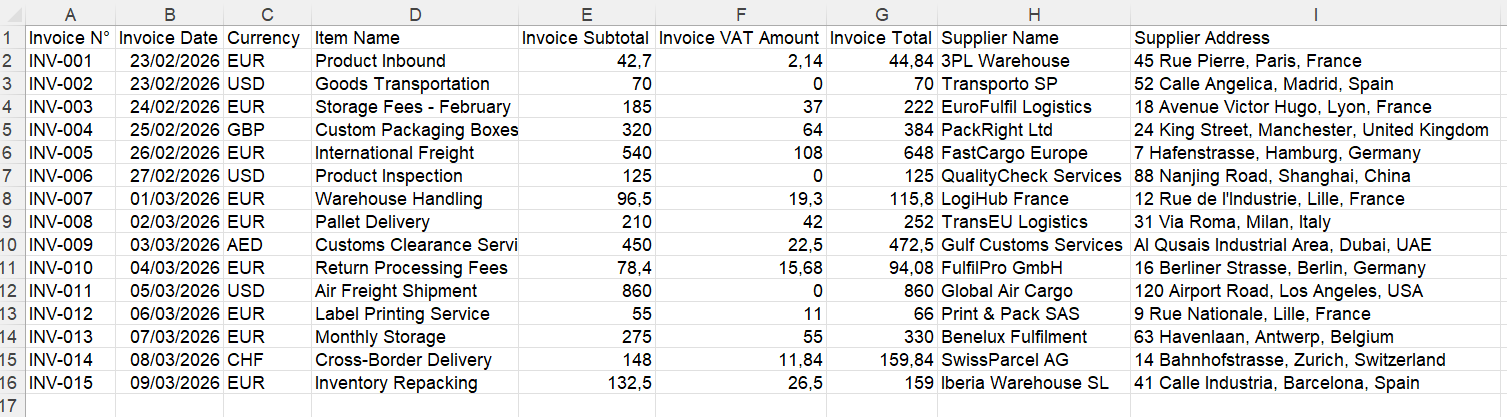
Generic invoice export illustrating document rows, not a travel-specific customer result. Your selected travel fields determine your columns.
Choose one row per item when you need repeated entries, such as separate hotel charges or flight segments explicitly listed in the document. Name the requested fields precisely. If a file contains both itinerary details and unrelated fee tables, do not assume they will be paired correctly.
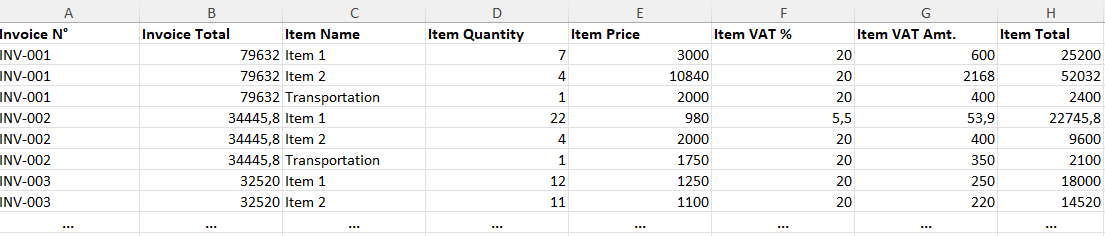
Generic example of item rows. Shared document values can repeat alongside the extracted entries.
For mixed layouts, separate hotel and flight batches with suitable field selections. The current output limit is 500 rows per file. Check extraction notices: absent or ambiguous repeated items can produce a document summary instead.
Review before adding the data to your trip workbook
Compare the editable results with the original files before exporting:
- Distinguish invoice date, departure date and stay dates. Dates remain text for review.
- Check booking references, passenger names and supplier identities.
- Separate invoice totals from deposits, amounts already paid and outstanding balances.
- Check negative values and document type for refunds or credit notes.
- Verify currency before combining amounts. An unclear symbol may remain a symbol.
- Inspect missing cells and numeric values preserved as text because their format was ambiguous.
In item mode, do not sum an invoice total repeated on several rows. Use the appropriate item amount or a separate document-level register.
Organize the reviewed exports in Excel
After export, add an internal trip ID and the original filename or document link yourself if needed. Keep the same column order when appending later exports to your master workbook; IntoExcel does not automatically synchronize that workbook.
In this hypothetical trip, the hotel confirmation and hotel invoice might concern the same stay. Record both for reference, but choose deliberately which document supplies the expense figure. Similarly, a payment receipt can evidence a payment without being an additional purchase.
Filter the table by client, supplier, travel date or currency. Add review status and your own categories in Excel. IntoExcel prepares extracted tables; it does not manage bookings, track flight changes, reconcile payments automatically or convert currencies using live exchange rates.
Try the workflow on a small trip file set
Start with a readable flight invoice and hotel invoice in IntoExcel.com. Choose a few useful columns, check both outputs and expand the selection only where the extra detail helps.
Keep the original documents alongside the reviewed workbook. The useful result is a traceable register of travel paperwork, with clear distinctions between booking information, charges and payments.
Ready to try it yourself?
Stop wasting hours on manual data entry. Extract your PDF data to Excel instantly with our AI-powered tool.
Extraction