Extract Data from Clear PDFs and Scanned Invoices with IntoExcel
Turn PDFs and scanned invoices into a consistent Excel table, with practical advice on image quality, custom fields, line items and checking extracted values.

A supplier may email a digital PDF, send a scan of a paper invoice or share a photograph. The goal is the same: move the useful information into an Excel table without retyping every field.
IntoExcel.com accepts PDFs and images for AI document extraction. You choose the columns and whether the output should contain one row per document or one row per item. A readable source and a review of the results remain essential: submitting a blurry scan does not guarantee that missing detail can be recovered.
Digital PDF or scanned invoice: what changes?
A digital PDF often contains selectable text. An image-only scan stores the page as a picture, while some scanned PDFs also contain a searchable text layer. Being able to select text therefore does not tell you everything about the document's origin or quality.
For extraction, check the actual content: are the invoice number, decimal separators and column headings legible? A clear scan can be more useful than a poorly exported digital PDF with cropped totals.
IntoExcel sends the supplied PDF or image to its AI extraction model. You do not need to choose a separate OCR mode. The task is more than recognizing words: the model must associate each value with the requested column.
1. Prepare a readable source
Use the original PDF when available. For a scan or photograph:
- Include the whole page, especially references, totals and table edges.
- Keep the page upright and reasonably flat.
- Avoid glare, shadows across numbers and motion blur.
- Check small characters at normal zoom before uploading.
- Include the relevant pages of the same invoice.
Keep one distinct document per file. The current flow processes only the first document when a file contains several separate invoices. Upload separate invoice files rather than combining them into a single bundle.
Open the IntoExcel extraction page and add your PDF or image.
2. Select fields that match your spreadsheet
Expand Invoice, Receipt & Purchase Order and tick the fields you need. Expanding the category only reveals its fields; Select all selects the category.
For an invoice register, start with supplier name, invoice number, invoice date, subtotal, tax amount, total and currency. Add line-item fields only if your task needs that detail.
| Information | Recommended kind | Why |
|---|---|---|
| Invoice number or product reference | Text | Preserve letters and leading zeros |
| Invoice date | Text | Keep the date wording for review |
| Subtotal, total, quantity or unit price | Number | Support calculations when clearly recognized |
| Tax rate | Percentage | Display a rate as a percentage |
| Currency | Currency | Use a code when the document establishes it |
Default fields already have assigned kinds. For another value, use Create Custom Fields, enter a precise name and choose Auto, Text, Number, Percentage or Currency. For example, “Purchase order reference shown on the invoice” is clearer than “Reference”.
3. Choose document rows or item rows
Choose one row per document for a register of invoices. Each document contributes its own row of selected values.
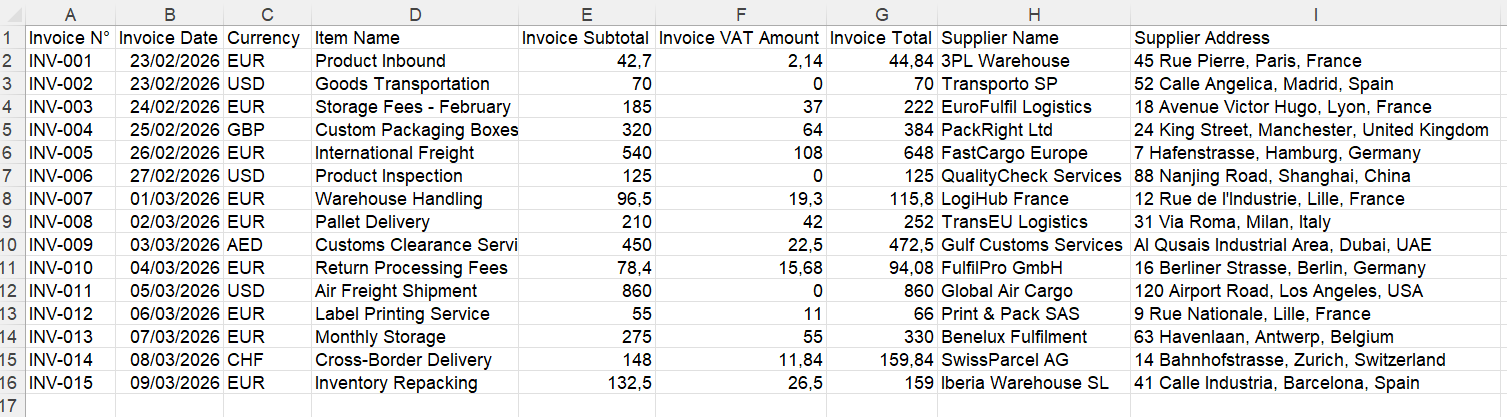
Example of a document-level Excel layout. Actual columns depend on your selection.
Choose one row per item when you need product descriptions, quantities and unit prices on separate rows.
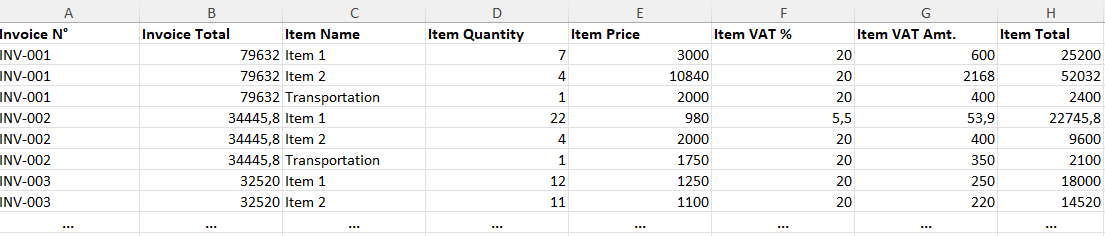
Example of item-level output. Shared invoice details can repeat beside each item.
Do not sum a repeated invoice total as though it were the value of each item. If you need a printed line total, create a custom Number field such as “Line total excluding tax as shown”. A unit price and a line total are different values.
4. Review the extracted table
Run extraction and check the editable results against the source before exporting. Pay particular attention to:
- Invoice numbers where a zero could resemble the letter O.
- Decimal separators and negative amounts, especially credit notes.
- Subtotal, tax and total being assigned to the correct columns.
- Item descriptions, quantities and prices remaining on the same row.
- All pages and relevant items being represented.
Missing information appears as an empty cell, not a fabricated value. An ambiguous currency symbol may stay a symbol instead of receiving an assumed code. A numeric value that cannot be safely normalized can remain text; correct it before using it in calculations.
The current limit is 500 output rows per file. Check any truncation notice. If no repeated items are found, or unrelated tables make them unclear, item mode can return a document summary instead of the detailed table you expected.
5. Export and use the Excel file
Export after reviewing. Clearly recognized numbers become numeric cells, and percentages use percentage formatting. Dates remain text. Excel's settings affect decimal display, so check the workbook in the environment where it will be used.
A consistent column selection can help you compare different supplier layouts, but it does not guarantee correct extraction from every source. Keep the original invoices available for checking.
If a scan produces poor results
Improve the source before retrying: request the original PDF, rescan the page or retake the photograph with better lighting. More elaborate field names cannot restore digits that are absent or unreadable.
For a hypothetical test, use one readable digital invoice and one readable scan with the same selected columns. Compare each output with its own original; note missing or incorrect values rather than judging only the appearance of the spreadsheet.
Try a small representative batch in IntoExcel.com. Choose the fields and row mode that serve your task, review the result and export the checked table.
Ready to try it yourself?
Stop wasting hours on manual data entry. Extract your PDF data to Excel instantly with our AI-powered tool.
Extraction