Best Document Extraction Tools for September 2026
A practical shortlist for spreadsheet exports, recurring documents and custom workflows, with pricing context and a checklist for testing your own files.
The best document extraction tool depends on what you need after reading the PDF. An accountant building an invoice spreadsheet, an operations team connecting business systems and a developer building an application have different requirements.
For September 2026, our shortlist is IntoExcel.com, Docparser, Nanonets and Google Document AI. Here is how we would choose between them for document data extraction, rather than treating every OCR product as interchangeable.
Published by the IntoExcel team. Features and pricing references checked on September 19, 2026. This is a use-case comparison based on product documentation and IntoExcel's implementation, not an independent accuracy benchmark. Prices and terms can change.
Which document extraction tool should you consider?
| Your main requirement | Our suggested starting point | What to test |
|---|---|---|
| Turn PDFs and images into an Excel table | IntoExcel | Selected columns, numeric values and row structure |
| Process recurring document layouts | Docparser | Setup effort across your different layouts |
| Connect extraction with business workflows | Nanonets | Every processing step and its total cost |
| Build extraction into your own software | Google Document AI | Engineering effort and processor suitability |
These are recommendations for where to start evaluating, not measured rankings. Use the same representative files when comparing tools.
IntoExcel: for a direct document-to-Excel workflow
IntoExcel.com is a practical starting point when your deliverable is a spreadsheet. Upload PDFs or images, select your fields, review the extracted table and export to Excel. Default field groups cover invoices, receipts, purchase orders and bank statements; custom fields let you request other information.
Before extraction, choose one row per document for a register or one row per item for repeated entries. For example, a hypothetical purchasing task might need invoice totals for a monthly overview, but quantities and unit prices for a supplier comparison.
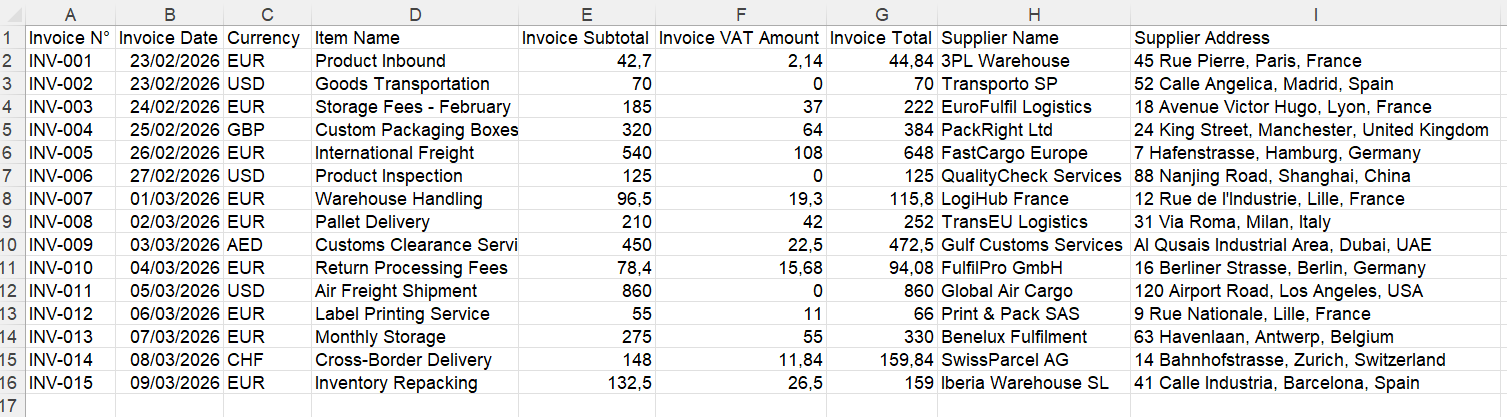
An example of the document-level spreadsheet layout.
Custom columns have five available kinds: Auto, Text, Number, Percentage and Currency. Use Text for references that may contain leading zeros and Number for amounts. Missing information produces an empty cell. Unclear currency symbols may remain symbols, so review them before combining monetary values.
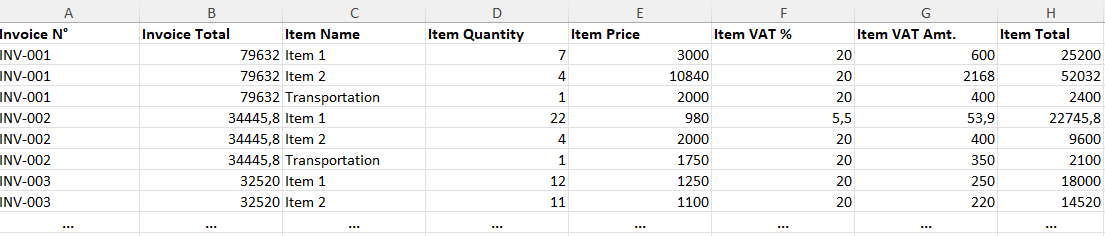
An example of item-level rows. Do not sum document totals repeated across several items.
A free account includes 20 extractions per month. Paid subscriptions and additional credit packs are listed on the IntoExcel pricing page. Check the current checkout amount before purchasing.
The Pro subscription costs US$9 per month for 200 extractions per month. The Business subscription costs US$40 per month for 1,000 extractions per month.
Check before choosing: extraction still needs review. The current output is capped at 500 rows per file, so inspect any truncation notice on long documents. Excel export also does not automatically post entries into your accounting software.
Try your own files in the IntoExcel document extraction tool.
Docparser: for recurring document layouts
Docparser offers configurable parsing rules and templates. We would evaluate it for repeated layouts where setup can be reused. Check how much adjustment a new supplier format needs.
Starter costs US$39/month with monthly billing, including 100 credits; each covers a document up to five pages. Excel export is included. See Docparser's pricing.
Nanonets: for connected processing workflows
Nanonets combines AI extraction, data transformation and exports in workflows. Billing depends on block runs; extraction counts pages, while other steps can add charges. See its workflow billing documentation.
Our recommendation: evaluate the entire route from incoming file to usable record. A low extraction cost alone does not establish the total cost of a workflow.
Google Document AI: for developer-built applications
Google Document AI provides document processors through a cloud service. We would shortlist it when a developer will build the surrounding upload, review and export experience.
Form Parser's standard first-tier rate is US$30 per 1,000 pages, up to one million pages monthly. Other processors differ. See Google's pricing.
Compare the cost of the complete application, including development and any additional cloud services, with a ready-to-use extraction tool.
How to test PDF and invoice extraction tools fairly
- Define the output first. Choose the columns and whether a row represents a document, invoice item or bank transaction.
- Use varied source files. Include your usual scans, multi-page PDFs, currencies and supplier layouts.
- Check individual fields. Compare references, dates, amounts, tax rates and item counts against the original documents.
- Open the actual export. Test calculations, leading zeros and decimal display in your own Excel settings.
- Measure total effort and cost. Include setup, corrections and review, not just the time spent uploading.
For example, a hypothetical test of 20 documents should use the same files and expected columns in every tool. Record missing or incorrect values; do not assume a neatly formatted spreadsheet proves extraction accuracy.
Questions to ask before choosing
Is OCR enough to create a useful Excel file?
Reading text is only part of the job. You also need the right values assigned to the right columns, with a consistent structure for repeated items.
What is the cheapest document extraction tool?
There is no universal answer. Compare your volume, page counts, required processing steps and review time. A document credit and a page charge are different units.
Where should I start if I only need Excel?
Start with a small batch in IntoExcel's extraction page. Choose your fields and row mode, review the results against the originals, then decide whether the workflow meets your needs.
Ready to try it yourself?
Stop wasting hours on manual data entry. Extract your PDF data to Excel instantly with our AI-powered tool.
Extraction