How Accountants Can Save Hours by Automating Data Entry
Build a practical invoice-to-Excel workflow: choose your fields, extract document or item rows, review the results, and measure the time saved.

Copying supplier names, invoice numbers and totals into Excel adds repetitive work to an accountant's day. Document extraction can reduce that typing by creating a first draft of the spreadsheet for you to review.
With IntoExcel.com, you choose the columns you need and decide whether each row represents a document or an individual item. After extraction, you can check and edit the results before downloading your Excel file.
Where accounting data entry takes time
An invoice register often starts with the same routine: open a file, find the supplier and reference, copy the date and amounts, then repeat for the next document. Different invoice layouts make this work harder to standardize.
Automating invoice data extraction shifts part of that work from typing to checking. The aim is to spend less time copying values while keeping control over the data you use.
Choose the fields your spreadsheet needs
Start with the columns required for your task. For an invoice register, a useful selection is:
| Field | Kind | Purpose |
|---|---|---|
| Supplier name | Text | Identify the supplier |
| Invoice number | Text | Preserve references, including leading zeros |
| Invoice date | Text | Keep the date as extracted text |
| Invoice subtotal | Number | Record the amount before tax |
| Invoice VAT amount | Number | Record the tax shown |
| Invoice total | Number | Record the total shown |
| Currency | Currency | Identify the currency separately from amounts |
IntoExcel's default fields already have assigned kinds. When creating a custom field, give it a clear name and choose Auto, Text, Number, Percentage or Currency. For example, use Text for a purchase order reference and Percentage for a tax rate.
Choose Currency for the currency itself, not for a monetary amount. If the document does not clearly identify a currency, a symbol may remain in the result and need your review.
Extract invoice data into Excel with IntoExcel
1. Upload your documents
Open the IntoExcel extraction tool and select or drop your PDF or image files. Use a separate file for each document: when one file contains several distinct documents, the extraction processes only the first.
2. Select your columns
Choose the default fields you need and add any custom fields. Specific labels such as “Purchase order reference” give a clearer request than “Reference.”
3. Choose one row per document or item
One row per document suits an invoice register with a supplier, invoice number and total for each file.
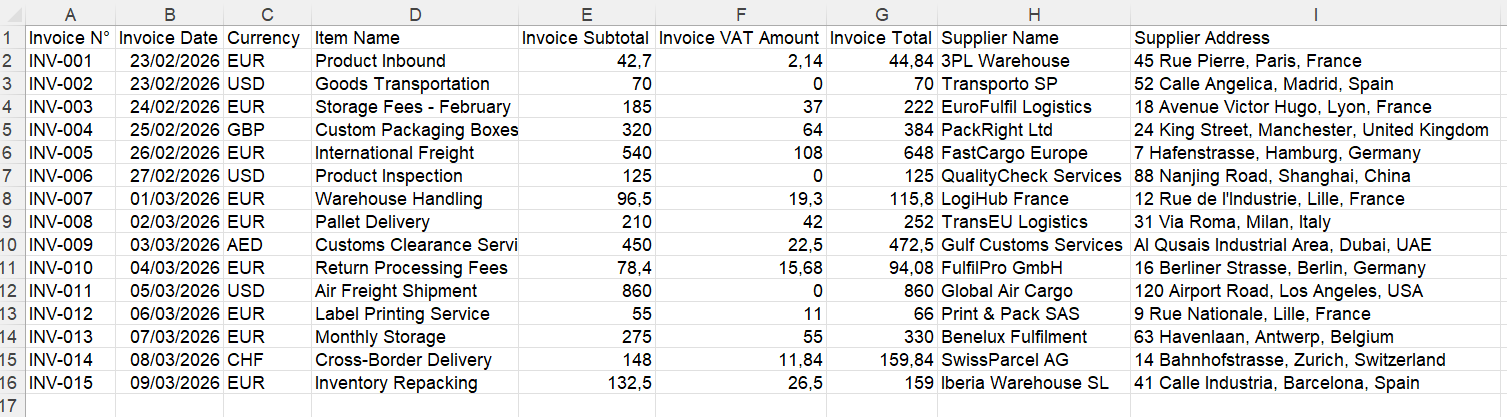
Example of a document-level spreadsheet. Your columns depend on the fields you select.
One row per item suits a detailed purchase analysis. Select fields such as item name, quantity, unit price and tax rate alongside the invoice reference.
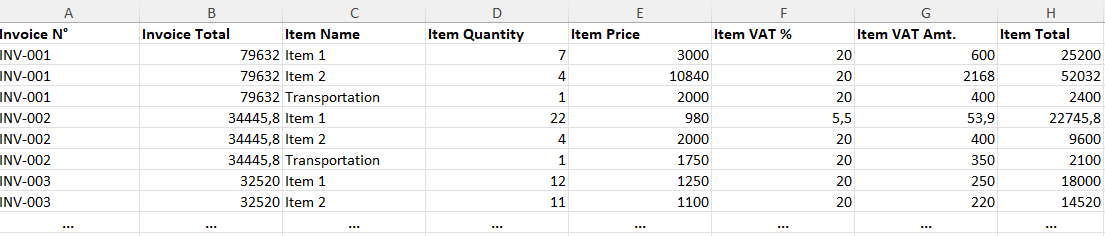
Example of item-level rows. Invoice-level values may repeat for each item: do not sum a repeated invoice total as though it were an item amount.
4. Extract, review and download
Run the extraction, compare the results with the source documents, and edit any cells that need correction. Then download the Excel file.
The export gives you a spreadsheet to work with; it does not, by itself, post entries into your accounting software.
A hypothetical time-saving example
Suppose you process 200 invoices in a month. For illustration only, assume manual entry and checking take three minutes per invoice:
- Manual workflow: 200 × 3 minutes = 10 hours.
- Extraction workflow: assume 1 hour for preparation, uploads, processing and export, plus 1 minute per invoice for review and corrections.
- Total extraction workflow: 4 hours 20 minutes, a difference of 5 hours 40 minutes.
These are made-up planning assumptions, not measured IntoExcel performance or a customer result. Complex documents and additional corrections could reduce or eliminate that saving. Try a representative batch and measure the entire workflow, including review.
What to check before using the spreadsheet
Compare invoice references, dates, totals and tax amounts with the originals. A missing value is represented by an empty cell, so investigate blanks rather than treating them as zero.
Keep amounts in different currencies separate. Check ambiguous currency symbols, and confirm that values you want to calculate with are numbers rather than text. Dates are extracted as text, so convert them in Excel if your workflow needs date calculations.
For item rows, verify that the expected items are present and distinguish item amounts from repeated document totals. Also check that you have not uploaded the same invoice twice.
Try it on a small batch
Choose a few invoices with different layouts, define the columns for your register, and compare the exported results with the originals. This gives you a practical basis for deciding where extraction fits into your accounting workflow.
Ready to try it yourself?
Stop wasting hours on manual data entry. Extract your PDF data to Excel instantly with our AI-powered tool.
Extraction