10 Types of Documents Businesses Should Extract Data From
Choose useful fields for invoices, receipts, bank statements, contracts and more, then build a document register or item-level table with IntoExcel.

Business documents become easier to compare when their key information is organized into consistent columns. But extracting every available value is rarely the best starting point. First decide what you want to track: spending, orders, transactions, stock or agreement dates.
Here are 10 types of documents businesses should extract data from, with suggested fields and practical checks. IntoExcel.com lets you upload PDFs or images, choose default or custom fields, review the results and export them to Excel. The suggestions below are starting points to test on your own documents, not a guarantee that every layout will be read correctly.
1. Supplier invoices
Useful fields: supplier name, invoice number, invoice date, subtotal, tax amount, total and currency.
Choose one row per document for an invoice register. For purchasing analysis, choose one row per item and request descriptions, quantities and unit prices. Keep invoice references as Text to preserve leading zeros. Check credit notes separately so their amounts are not mistaken for new charges.
2. Expense receipts
Useful fields: merchant, receipt date, receipt reference, tax, total and currency.
A receipt table can support expense review. Employee names, reimbursement status and internal categories may not appear on the receipt; add that information yourself in Excel. Do not ask extraction to invent it. Review faded printing and distinguish the amount paid from change returned.
3. Purchase orders
Useful fields: order number, supplier, order date, product reference, ordered quantity, unit price and stated delivery date.
Use one row per item to compare what was ordered with invoice or delivery data. Keep ordered quantities separate from delivered quantities. A purchase order records an order; it does not by itself establish that goods arrived or payment was made.
4. Bank statements
Useful fields: transaction date, description, reference, debit, credit, currency and any running balance shown.
Choose one row per transaction using item mode. Give custom fields precise names such as “Debit amount as shown” and “Credit amount as shown”. Check signs, statement periods and opening and closing balances. Extracting transactions prepares a table for reconciliation; it does not automatically match them to invoices.
5. Financial reports
Useful fields: reporting period, metric or account label, reported amount, currency and unit scale.
A report may mix actuals, budgets and previous periods. Request specific columns such as “Actual amount for the current period” instead of simply “Amount”. Record whether figures are in units or thousands. For unrelated tables, extract a clearly scoped section rather than assuming every row belongs together.
6. Product catalogs and price lists
Useful fields: product code, description, pack size, unit of measure, listed price and currency.
One row per product can provide a basis for supplier comparisons. Use Text for product codes, including codes made entirely of digits. Check whether a price applies to a single item, a box or another unit, and whether tax is included. The table is a snapshot of the supplied catalog.
7. Delivery notes
Useful fields: delivery-note number, order reference, stated delivery date, product code and delivered quantity.
Use item mode for a detailed list. Compare it with your order table in Excel, checking partial deliveries and unit differences. A quantity written on a delivery note still needs to be checked against your receiving records; extraction cannot verify physical receipt.
8. Contracts and service agreements
Useful fields: agreement reference, named parties, signature date, stated start and end dates, and payment terms as written.
One row per agreement can help build a searchable register. Use custom Text fields for dates and clauses. Review the original wording and any amendments before relying on the table. This is extraction of stated information, not interpretation of obligations or an automatic deadline calculation.
9. Inventory reports
Useful fields: report date, product code, location, stock quantity and unit of measure.
Choose one row per inventory entry. Preserve location and date so you do not merge quantities from different warehouses or reporting periods accidentally. Extracted stock is a snapshot, not a live inventory feed. Check repeated product codes before treating rows as duplicates.
10. Shipping documents
Useful fields: shipment reference, carrier, origin, destination, dispatch date, package count, weight and stated freight charge.
Select document mode for a shipment register or item mode for a packing list. Keep estimated dates separate from actual dates where both appear. The result can support logistics review, but uploading a shipping document does not provide live tracking or confirm delivery.
Choose the Excel structure before extracting
Use one row per document when you need a register of references, dates and totals.
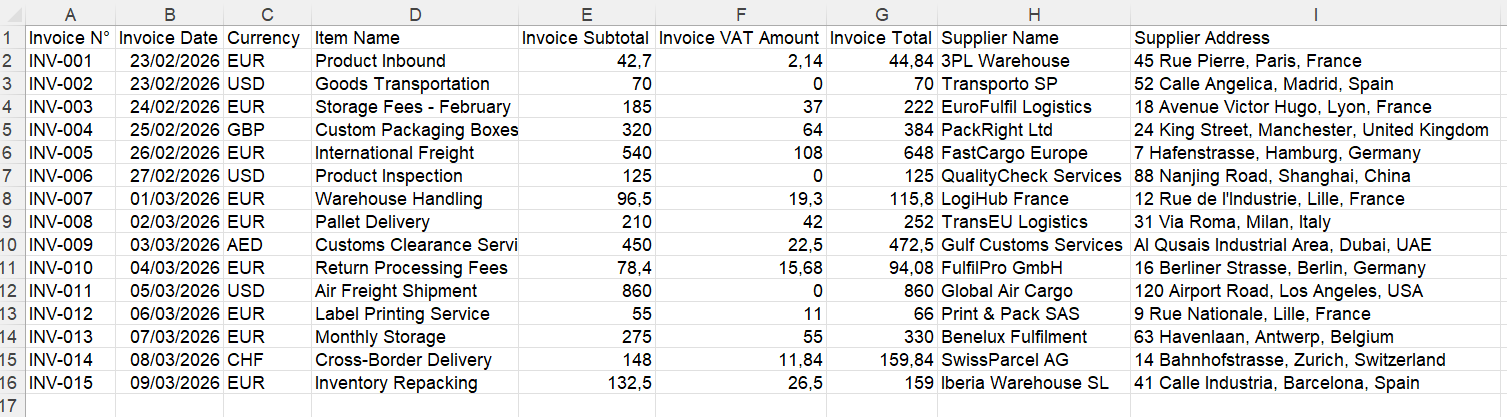
Example of a document-level Excel table.
Use one row per item for products, transactions or stock entries. Shared document values can repeat on each row: do not sum a repeated invoice total as though it were an item amount.
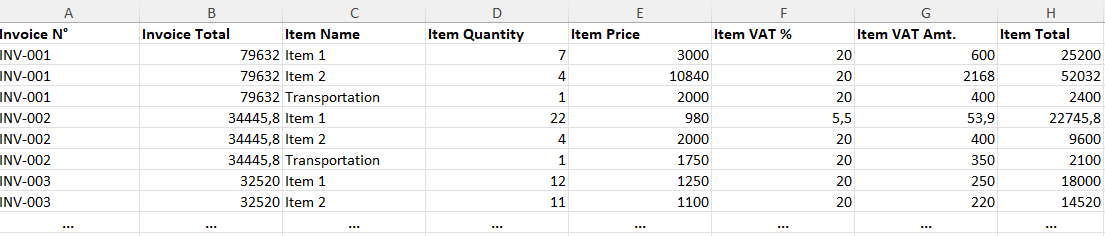
Example of item-level output. Choose columns that describe the repeated entries you need.
Set up your extraction in IntoExcel
- Open the IntoExcel document extraction page and upload your PDF or image.
- Select relevant default fields or create custom fields with clear names.
- Choose a field kind: Auto, Text, Number, Percentage or Currency. Dates and identifiers work as Text; amounts and quantities usually need Number.
- Select document or item rows, then run extraction.
- Review the table against the original and export to Excel.
Missing values appear as empty cells. Ambiguous currencies may remain symbols rather than an assumed currency code. Check those values before calculating totals across files.
Keep one distinct document per file: the current flow processes only the first document in a combined file. Output is limited to 500 rows per file, so check any truncation notice. If the intended repeated entries are unclear, the output can fall back to a document summary.
Start with one recurring task
A hypothetical purchasing workflow might compare an order, a delivery note and an invoice. Extract each separately, then compare their references, quantities and amounts in Excel. IntoExcel prepares the tables; you still perform the matching and investigate differences.
Start with a small representative batch in IntoExcel.com. Keep the source files alongside your reviewed spreadsheets, and expand your field selection only when an additional column serves a clear purpose.
Ready to try it yourself?
Stop wasting hours on manual data entry. Extract your PDF data to Excel instantly with our AI-powered tool.
Extraction